Showing posts with label Findability. Show all posts

Tuesday, November 01, 2011

SharePoint Information Architecture from the Field

Over the years, I've written quite a few articles on how to technically structure your SharePoint solutions into web-apps, sites, subsites, lists and document libraries. All based on having a defined Information Architecture (IA) as a basis for the solution design, or at least being able to reason about your content management using my "chest of drawers" and "news paper" analogies. The latter is based on my experiences from the field as most companies don't have a well-defined IA in place.

Common questions from customers are "what is Information Architecture?" and "what is the value of having an IA for SharePoint, can't we just create sites and doc-libs on the fly as needed?". Not to forget "how do we go about creating an Information Architecture for SharePoint?". So here are some IA advice from Puzzlepart projects:

In short, Information Architecture defines how to classify and structure your content so that it is easy for content consumers to find and explore relevant content, while making it simple for workers to contribute and manage content in an efficient manner.

The business goal of having an Information Architecture for your SharePoint solution is enabling workers to contribute, store and mange content in a manner that is simple and efficient, enabling more content sharing; and at the same time making it easy for workers to browse and find content they need, while also making it easy for workers to discover and explore relevant content they didn't know of. The outcome is more knowledgeable workers that are better informed about what’s going on in the company and about the range of intellectual property possessed by other employees, while also saving time wasted on finding information, and time wasted on incorrect or outdated information.

An outcome is a metric that customers use to define the successful realization of the objectives and goals. Outcomes happens after the project has delivered on its objectives and goals, and the customers must themselves work against securing the outcomes to achieve the desired business value.

The business value of having a working IA is capturing company knowledge from employees with better quality of shared content, which combined with good findability drive more knowledgeable workers that make better decisions and better faster processes. In addition, more and better content sharing helps user not only discover and explore content, but also people such as subject matter experts, allowing employees to build and expand their network throughout the company, helping the company to retain talented employees through social ties and communities. Access to discover more and better content and people expertise is central to enabling innovation and process improvement, as new knowledge is a trigger for new ideas and for identifying new opportunities.

The process of defining your IA for your SharePoint solution should focus on these objectives and goals:
  • Analyze and define the content classification and structure for the solution 
    • goal: identify what content to manage and plan how to store it in SP, leading to sites, subsites and doc-lib structure organized into SP web-apps
  • Analyze and define how to browse and navigate the content
    • goal: make it simple and efficient for users to find and use known content that they need in their daily work to drive better faster processes
  • Analyze and define how to discover and explore the content
    • goal: make it easy for users to stumble upon novel shared knowledge based on "common focus" to trigger innovation and build social ties
  • Provide simple and efficient content contributor experience with liberal appliance of default metadata values, storing content close to the authors 
    • goal: make workers contributors, not knowledge management grunts, and help them store content correctly with better metadata and tagging, driving findability and "common focus" content discovery; drive better sharing and collaboration
  • Analyze and define the starter content types with metadata and term set taxonomy based on the defined site and doc-lib architecture, with a strong focus on needed search experience capabilities
    • goal: enable content management and support both search-driven and "common focus" content; drive findability, sharing and innovation
  • Analyze and define the policies for social tagging and rating in the solution, also in relation to user profile interests, skills and responsibility tagging
    • goal: drive "common focus" content discovery, drive findability, drive social communities, drive innovation
  • Analyze and define the search experience, focusing on both search-driven content and on search center scopes and refiners
    • goal: drive findability and provide both search-driven and "common focus" content
  • Enable disposition of redundant and irrelevant content 
    • goal: provide users with better, correct and up-to-date information, drive findability, save storage cost, save process cost
Including the search experience helps you avoid an initial version of your IA with a too narrow scope, which is easy to do for a starter IA when e.g. analyzing only project collaboration needs or just the document types of an attachment-based intranet. It makes you focus on what you get out, not only what you put in.

Note that navigation is not IA, its just one way to explore the content. Using navigation to structure your content is just reapplying the fileshare folder approach, which we all know doesn't work too good for findability and discovery. Navigation should not define the statical IA structure for the content, do a LATCH analysis to model the possible IA structures, and choose one of them to define the statical IA structure. The site map is closer to define statical IA structure than navigation, still it is only good for logical IA structure and cannot be expected to be used directly as the physical IA structure in SharePoint.

In an upcoming article I will give some practical advice from the field on how to define and realize the Information Architecture for your SharePoint solution in an agile fashion.

Wednesday, August 04, 2010

Five Steps to Structure Your SharePoint Sites (Part III)

At every SharePoint customer and in every SharePoint project, the issue of how to realize a future-proof, working site structure arise. I've written a few blog posts on classification and structuring of SharePoint sites before (part 1 and part 2), focusing on scalable site structure design within the SharePoint system boundaries. This post is about getting from a classic site map based approach to a methodology driven by Information Architecture and the site classification pyramid, combined with the SharePoint containment hierarchy and SharePoint governance best practices. The latter is important as the management and usage of a site, and the service level agreement for the site, strongly influence how the overall SharePoint solution should be partitioned to adhere to architecture best practices.

Most information architects come up with a content organization model like a site map with hierarchical URL scheme. "This is the draft model, and we want the URL structure to be like this in our SharePoint solution" they say. "That's a very useful mental model of the site" I respond, "but what you really want is a good, intuitive navigation concept, helping users find what they need - like an invisible guiding hand; not that specific URL structure". Having a simple and easy mental model for the site structure is important, as it makes it easy to both contribute and find content, driving findability when the amount of information stored and managed in SharePoint grows.

Alas, that is not the primary issue with the site map approach for designing SharePoint site structures. The site map is closer to define statical IA structure than navigation, still it is only good for logical IA structure and cannot be expected to be used directly as the physical IA structure in SharePoint.


Using a site map approach to design a SharePoint site structure will only work in simple scenarios with homogenous solution domains, such as a publishing portal or a collaboration solution with limited document storage and versioning. It will fail when the SharePoint solution domains and their usage, governance and service level agreements differ, not to forget when the overall amount of data stored in SharePoint surpasses the 100GB limit per content database. The wanted URL structure might not be possible to realize in most cases anyhow when adhering to SharePoint architecture best practices.


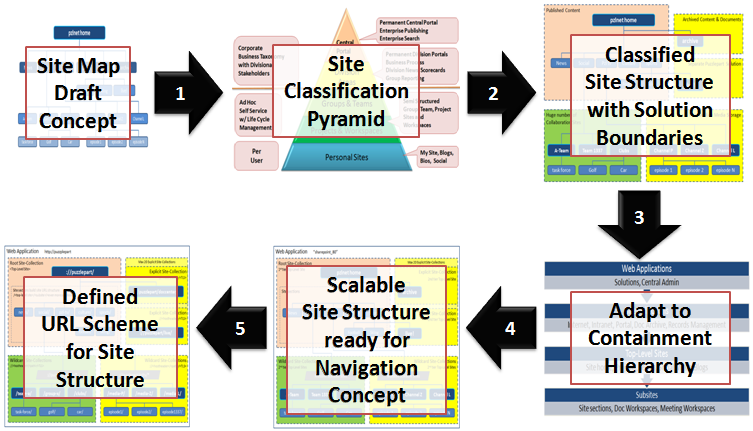
A more structured approach is needed to design a SharePoint site structure according to architectural and governance best practices. My methodology involves a process with these five steps:

  1. Review your site map draft model against the SharePoint site classification pyramid and your governance plan for each of your identified site types.
  2. Partition your sites into solution domains based on site type and governance policies aspects such as business purpose, usage patterns, storage requirements, management boundaries, information security and isolation, operations and service level agreements.
  3. Adapt the site structure to the SharePoint containment hierarchy, adhering to limits and best practices based on the partitioned solution domains.
  4. Use the main SharePoint architectural components explicit and wildcard site-collections to ensure a scalable design that allows for future growth and expansion into new business domains. Use wildcard site-collections by default as these are super scalable. Adapt or customize SharePoint global menu and current menu to your navigation concept, to hide the solution partitioning.
  5. Define your URL scheme using host headers, manage paths and site provisioning policies.
Following these five steps is a top-down approach that is more understandable for non-techies. However, from step 3 onwards, good technical knowledge of SharePoint architecture is required.


To successfully design a working and scalable SharePoint site structure, you need a site classification scheme. I recommend the classic site classification pyramid as it outlines typical solution domains with governance and site types, helping you classify sites and draw domain boundaries in your site model.


Then, after identifying the different solution domains that make up your overall SharePoint solution, you must map the identified solution domains to the SharePoint containment hierarchy. It is imperative that you understand the containment hierarchy and its boundaries, otherwise your solution will slowly stop working as more and more users create more and more sites and fill them with more and more information.


Site-collections is the main architectural component of SharePoint, in combination with the content database that stores the site-collection's content and documents. A web-application always have a single root (1st tier) site-collection, which is the home site of the web-application. A 2nd tier of site-collections can be added to the web-application as needed to scale the application, using SharePoint managed paths. A typical scenario is to add a new solution domain. Another typical scenario is to add room for more content and documents; because a site-collection cannot span content databases and adding more space thus requires a new site-collection. Use subsites for anything that is just a section of an existing solution domain or site. See the golf and car communities in the example, which functionally are "sites" in their own right. Read my post Classification and Structuring of SharePoint Sites (Part I) to learn more.


It's easy to choose what solution goes into the root site-collection of a web-application, typically this is the portal to the overall solution. As there is a limited set of explicit site-collections per SharePoint web-application, these should be reserved for a planned, wellknown small number of predefined sites. Use the limited set of available explicit site-collections for the top two types in the site classification pyramid. Note that root and explicit site-collection storage cannot be scaled as you cannot add another content database to a site collection. Use as few explicit site-collection as possible, stay well below the limit of 20 managed paths. Expect everybody to require vanity URLs such as ://puzzlepart/HR/ for their site, so a strict governance policy for 'explicit' is required.

Use wildcard site-collections when the predictable number of sites is too large for explicit, typically for the bottom three types in the site classification pyramid. Also use wildcard site-collections even for central portals and division areas when there is no absolute requirement for an 'explicit' 2nd tier top-level site. See Puzzlepart TV in the example; even if the channel sites are classified as 'division area' (yellow color code) they do not need to be 'explicit'. In fact, due to their massive storage requirements for rich media content, best practices dictate the use of 'wildcard'. Always use wildcard site-collections for solutions have a limited life span such as projects.


Finally, after composing your scalable site structure design from root, explicit and wildcard site-collections, define the URL scheme that underlies the site structure. Use short descriptive URL elements for web-applications, managed paths and site-collections. The combination of these elements become the URL of the top-level sites that are what the users actually interacts with when using SharePoint. Note how the URL structure is affected by the SharePoint containment hierarchy. Compare ://puzzlepart/pzl-tv/ and ://puzzlepart/pzltv/ in the example, the latter contains child sites of the former in the overall navigation concept. In addition, I recommend defining and enforcing policies for all URL elements that users can provision, such as subsites, lists and libraries, to avoid non-friendly URLs with anything from spaces to special characters.

It is very likely that you will need to customize the ootb SharePoint navigation provider and menu rendering to have a consistent navigation experience across sites, sections and pages. Users get very confused and annoyed when the content of the top menu changes as they navigate from site to site, which is very understandable. There are several ways to implement common menu and navigation across site-collections, but that's left as an exercise for my readers.

The capacity and planning boundaries are mostly the same in SharePoint 2010 as in SharePoint 2007 for web-applications, site-collections and content databases. The most significant change is that SharePoint 2010 now supports max 250 000 site-collections per web-application, five times the limit for 2007. The max number of content databases per web-application has increased from 100 to 300, on the other hand the max number of site-collections per content database have been reduced from 50 000 to max 5000 with a recommendation of 2000 site-collections per content database. None of these numbers are hard limits, these are numbers for acceptable SharePoint performance.

Wednesday, May 12, 2010

Minimal SharePoint Governance Plan - Part III

This is part III in a mini-series about the Minimal SharePoint Governance Plan needed to get you started with your SharePoint governance efforts.This part gives a more detailed overview of the mininal governance plan. The overview comprises operational and functional areas from SharePoint architecture, via site, user and information lifecycle management, to realization of SharePoint solutions. As you will see, there is a multitude of governance aspects, even if just focusing on the technical aspects. Executing on all governance aspects from day one is not viable, that is why I recommend to start with simple governance.

The is no one governance plan to rule them all. Governance is too multi-faceted for a single set of policies to fit all the different site types across diverse business areas. Governance for controlled publishing sites will be very different from Enterprise 2.0 pull-style situational solutions, as will it differ for management of project sites and team sites, and as for community, social and personal sites. Adapt your governance plan according to the targeted solution.


The site classification scheme shown here is from the Technet SharePoint Governance Checklist Guide, refer to page 20 for more details.

Architectural Governance

The governance plan for the SharePoint solution must define a logical architecture model based on your Information Architecture analysis, adhering to architectural components, farm deployment, capacity and planning recommendations on Technet.

• Farm design policies for a robust and flexible platform
• Sharing and isolation policies for applications and information
• Site-collection structure policies to drive overall solution architecture & governance
• Information asset structure policies to ensure classification, management and findability

The objective of having architectural policies is to create a workable farm and solution design considering hard and soft SharePoint limits.

Site Lifecycle Management

The governance plan for site lifecycle management (SLM) must specify policies for managing sites from creation to disposition. Define a classification scheme for site types and adapt your governance plan to each site type. It is recommended to develop timer jobs to automate and enforce SLM policies.

You need a site sweeper job that disposes expired, abandoned and useless sites from your solution to ensure that the overall effect produces useful business results. Make sure that knowledge captured in obsolete sites are retained through information management tasks before permanently disposing the sites. Alas, don't be afraid of self-service provisioning, after all more is different.

• SLM policies must be defined and enforced
• Site Provisioning
    o Implement custom provisioning if ootb functionality is not sufficient
    o Provisioning policy per site type defines level of automation and self-service
    o Use provisioning wizard to collection data related to SLM
    o Store SLM data in site properties or a site inventory list
• Site Retention
    o Do not rely on database backup for retention, backup retention might be shorter than site retention
    o Prepare to restore sites deleted by users
• Site Disposition
    o Implement custom site sweeper if ootb functionality is not sufficient
    o Standard site sweeper is only for site-collections (site use confirmation)
    o Define a procedure for information management when disposing a site

Note that there is no ootb site directory in SharePoint 2010. Still, just create a shared custom list and use it for inventory management of sites as part of your SLM implementation.

DocAve Backup & Recovery a recommended 3rd-party tool, it provides capabilities beyond ootb SharePoint 2010, such as item-level recovery. For site retention, the CodePlex MSIT Site Delete Capture tool is an option.

User Lifecycle Management / Identity & Access Management

The governance plan for user lifecycle management (ULM) must specify policies for managing users from onboarding to termination. ULM is directly related to information security (access and auditing), information management, and Identity & Access Management (IAM). Employees come and go, resulting in SharePoint data that nobody manages, or in worst case, lost knowledge.

Implementing good site disposition policies and good information management policies will reduce the efforts required for user lifecycle management, as obsolete sites and information then will be disposed of in a timely manner - keeping the quantity of orphaned data down.

• ULM policies must be defined and enforced
• Site memberships and permissions must be assigned for new users
• Site and information asset permissions & ownership must be handled when
    o Account is terminated
    o User transfers to another business role or department
• A policy for reassignment of ownership must be defined

Having tools for management of user permissions, ownership and lifespan is nice, but no prerequisite. LigthningTools DeliverPoint or Axceler ControlPoint are recommended partner solutions for user management.

Content Type Governance / Information Management

The governance plan must specify policies for content management according to your Information Architecture analysis and taxonomy. A taxonomy is realized in SharePoint using Site Content Types for information asset types and Term Sets for coherent tagging of information. Content types combined with metadata tagging is essential for information classification and for driving findability.

Content types defines the static classification hierarchy of the information managed in SharePoint. A content type is built from a set of fields defining the metadata of the content type, further detailing the classification of the information. Some metadata fields require the use of a controlled vocabulary for content tagging.

Information management policies can be assigned to content types. The most important are for retention and disposition of content, helping you manage e.g. outdated content to ensure the relevance and timeliness of your information.

• Reuse the Open-Closed Enterprise Taxonomy across web-applications and site-collections
• Always use a core Content Type Hub store for the enterprise taxonomy
• The core content type store defines company specific immutable base content types
• Ensure that all additional content types derives from the core content types, by extending the immutable base
• Use few required metadata fields, max 3-5 per content type
• Use sensible default values where possible
• Define polices for
    o Reusable content (document repository)
    o Retention of outdated content / historical archive (document repository)
    o Retention of expired content (records repository or disposition)
    o Regulatory compliance records (records management)
    o Disposition of content
• Retention policies are important for driving findability, use them to prevent irrelevant search results
• Define and enforce behavior using
    o Information Management policies
    o Workflows / Event receivers
• Use Information Management policies for
    o Retention, disposition, auditing, labeling / barcodes
• Ensure that content types are evolved according to best practices

The new SharePoint 2010 multi-stage retention support, combined with workflow and document /records repositories allows for implementing and enforcing sophisticated content management policies. Note that the new SharePoint 2010 Content Organizer only supports Document-based content types, in addition to e-mail messages.

Managed Metadata Governance

The governance plan must specify policies for management of the managed metadata used when tagging content in SharePoint. Managed metadata is a controlled vocabulary defined in the corporate taxonomy, realized in SharePoint 2010 as term sets defined in the Managed Metadata Service.

• Reuse the Open-Closed Enterprise Taxonomy across web-applications and site-collections
• Always use a core Managed Metadata Service term store for the enterprise taxonomy
• Allow local Managed Metadata Services for isolated, locally managed term stores
• Always use synonyms when defining terms, consistent content tagging is essential for content management and for driving findability
• Use term translation to support other languages for the term
• Avoid random or haphazard tagging due to unintelligible terms
• Enable managed keywords for user-driven freeform tagging of content
• Ensure that term sets are evolved according to best practices
• Define and enforce a policy for reviewing open term sets for improper usage

Note that search do not comprise term synonyms or translations when searching, it only finds the stored key term. The same applies to faceted search – or 'refinement panels' as they are called.

You can have multiple Term Set stores and Content Type Hub inventories in SharePoint 2010. This allows for combining both enterprise definitions and local definitions to support both shared and isolated taxonomy configurations. See Plan to share terminology and content types on Technet.

Social Tagging Governance

The governance plan must specify policies for management of the social tagging features

• Use managed keywords to enable folksonomy for content (list items)
• Use social tagging to enable folksonomy for "anything with an URL"
• Allow for managed metadata and managed keywords to be included in social tags
• Define and enforce a policy for reviewing the folksonomy tags for improper usage

Note that the social tagging of "anything with an URL" is provided by the SharePoint2010 User Profile Service application, not the Managed Metadata Service application. Thus, social tags have no explicit relation to the term store at all. The same applies to other SharePoint2010 social features such as ranking and social bookmarking.

Document Template Governance

The governance plan must specify policies for using Office templates in content types.

• Use a shared set of enterprise Office templates
• Manage and store templates in a SharePoint document library at a central location
• Do not store templates directly in content types, always reference the central shared templates
• Make use of the Office 2010 Backstage or the document information panel for managing metadata directly in Office

Office 2010 now has support for storing templates in a SharePoint repository. Use AD group policies to populate 'File > Save As' and to lock down storage locations such as file shares and local disk.

List & Library Definition Governance

The governance plan must specify policies for managing content in lists and libraries. It is strongly recommended to use only lists based on site content types, rather than directly customizing list definitions. Enforcement of consistent classification and information management policies depends on using site content types.

• List content
    o Use only a few content types per list
    o Content types in a list must be cohesive
    o Prefer list views over "dumb" folders
    o Use SharePoint 2010 folders when appropriate
• List permissions
    o Prefer using inherited permissions
    o Avoid user item level permissions
• Enforce content management policies using
    o Versioning, check-in/out, workflows / event receivers
• Information Rights Management (IRM)
    o Policies for document access and usage restrictions
    o Applies IRM policies when document is downloaded from library
    o Enable by installing Active Directory Rights Management Services (AD RMS)
• Information management policies
    o Prefer implementing IM policies on content types rather than on lists or libraries

Note that some of the new SharePoint 2010 features work only for document libraries, such as the Unique Document ID, Document Set and Content Organizer features.

Permissions Governance

The governance plan must specify policies for how to manage access to sites and information assets, including which permissions users and groups have. All experience shows that simple permission policies are more secure. The more intricate and fine-grained permissions assignments you have, the harder it is to know who has access to what – and the more likely it is that there will be information security breaches exposing confidential information.

• Use SP groups to manage user group memberships
• Build your SP groups from AD security groups
    o Management of AD group members is typically a bottleneck, thus avoid it
• Do not assign permissions to single users, always assign to SP groups
• Prefer inherited groups (role assignments)
• Prefer inherited permission levels (role definitions)
• Use unique permissions at site level (favored) or list/library level only when absolutely required
• Avoid assigning item level permissions
• Site-collections are preferred security management boundaries

The visibility into what a user has access to has improved a bit in SharePoint 2010, so has the usage reporting capabilities. Still, 3rd-party tools such as LigthningTools DeliverPoint or Axceler ControlPoint might be required for professional permissions management beyond the built-in SharePoint 2010 Permissions Tool.

Search Governance

The governance plan must specify policies for driving findability through indexing and search. The Information Architecture analysis defines the information taxonomy and organization blueprint realized in a SharePoint site structure capable of storing and managing your content. The site structure combined with content types enables findability through consistent classification and tagging of content.

• Ensure ease of adding information assets to correct location
    o Users should not have to enter a lot of required metadata
    o Users should not have to browse/navigate extensively to store content
    o Task context should deduce location, e.g. CRM client document store
• Metadata tagging through content types for all findable assets
• Use content type retention policies to prevent irrelevant, outdated search results
• Use search scopes to provide search context: people, tasks, articles, project, archive, etc.
• Use faceted search (refinement panel)
• Ensure and enforce information isolation
    o Farm design must prevent configuration mistakes from exposing confidential information by accident
    o Use separate service application groups or even separate shared services farms

The most valuable search is the one that connects a user to other people, as people are often the best sources of information and knowledge, especially tacit knowledge – know-how relating to new better business performance or to novel information that generate flow of new knowledge – in short, that ignites innovation. A former CEO of Hewlett Packard famously observed: "If HP knew what HP knows, we would be three times as profitable".

Findability is more than just search capabilities, it also includes the SharePoint 2010 social computing features such as “Tags & Notes” for tagging and social bookmarking. Tag clouds, metadata-based navigation and filtering, and even the My Site activity feed are all enablers of driving findability.

Note how I say "driving findability"; findability is not something you just enable, you have to actively manage and adapt the Search Service application settings according to your business needs. Just enabling search is just as bad as not managing your user's expectations for what to expect from enterprise search.

All parts of this mini-series:
Part I - SharePoint Governance - Eating an Elephant
Part II - Start with Simple Governance
Part III - Minimal Governance Plan (this post)

Tuesday, May 11, 2010

Start with Simple Governance - Part II

This is part II in a mini-series about the Minimal SharePoint Governance Plan needed to get you started with your SharePoint governance efforts. The objective is to create a simple and viable plan that covers the core governance aspects for operations and solution management. The plan comprises the functional areas of textbook enterprise governance plans, skipping organizational aspects to focus on technical aspects. The focus is on lifecycle management of SharePoint sites and users, classification and management of content, and on driving findability, all hosted on a robust SharePoint farm.

Required Operational Governance

The governance plan for the SharePoint environments must specify policies for both farm infrastructure and operations. The architecture of the farm must be adequate for hosting the planned solutions within defined service level agreements (SLA), and at the same time be positioned for future expansion into other solution areas.

Operational aspects that must be covered by the governance plan:

• Availability
    o Farm with redundancy
    o Monitoring
• Backup and Recovery
    o Retention and disposition policies must be defined and enforced
    o Restore specific information assets
    o Tested disaster recovery plan
    o Complete solution can be restored within allowed time limit

Usage of SCOM SharePoint management packs is recommended. For recovery is DocAve Backup & Recovery a recommended 3rd-party tool, it provides capabilities beyond ootb SharePoint 2010, such as item-level recovery.

Required Solution Governance

The governance plan for the SharePoint solution must specify policies for governing the sites and information assets that make up the solution. This especially applies to how to manage solutions over time as they evolve in response to changed business requirements.

Solution aspects that must be covered by the governance plan:

• Site Lifecycle Management (SLM)
    o Policies for provisioning, retention and disposition must be defined
    o Automation of SLM through site provisioning forms and timer jobs
    o Site delete capture for retention beyond database backups
• Content Type and metadata definitions (taxonomy)
    o Policies for retention and disposition, including archival and records, must be defined
    o Classification of all information assets, from sites to documents and items
    o Cover the core content types for your company (the immutable base content types)
    o Enable findability through consistent classification and tagging of content

SharePoint has little built-in support for SLM, but most SharePoint workflow tools provides support for user input forms and site creation and management. For site retention, the CodePlex MSIT Site Delete Capture tool is an option.

There is good taxonomy support in SharePoint 2010 provided by the Managed Metadata Service and the Content Type Hub mechanism. Note that neither managed metadata nor social tagging is included in SharePoint Foundation 2010, these are SharePoint Server 2010 service applications.

Optional Solution Governance

In addition to the above aspects, governance policies for how to manage users, their permissions and their ownership of sites and data should be defined. Employees come and go, resulting in SharePoint data that nobody manages, or in worst case, lost knowledge.

Solution aspects that should be covered by the governance plan:

• User Lifecycle Management (ULM)
    o Manage the lifecycle of accounts due to onboarding, transfering, and termination of users
    o Policies for permissions and ownership of sites and information assets
    o Automation of ULM though partner/open solutions
• Visibility into usage
• Visibility into permissions

The visibility into what a user has access to has improved a bit in SharePoint 2010, so has the usage reporting capabilities. Still, 3rd-party tools such as LigthningTools DeliverPoint or Axceler ControlPoint might be required dependent on needs.

SharePoint Governance Checklist

Microsoft provides a SharePoint governance checklist guide whitepaper that my customers find very useful. The checklist covers important governance and lifecycle management aspects that must be included in a governance plan. It is strongly recommended to review all areas of your governance plan against this checklist.

Aspects covered includes:
• Design-time and run-time governance
• Roles and ownership
• Information architecture, navigation and findability
• Branding
• Infrastructure and operations
• Testing and development

Each checklist has a related tips & information section, effectively making this a pocket governance guide.

All parts of this mini-series:
Part I - SharePoint Governance - Eating an Elephant
Part II - Start with Simple Governance (this post)
Part III - Minimal Governance Plan