Showing posts with label Design. Show all posts

Wednesday, August 04, 2010

Five Steps to Structure Your SharePoint Sites (Part III)

At every SharePoint customer and in every SharePoint project, the issue of how to realize a future-proof, working site structure arise. I've written a few blog posts on classification and structuring of SharePoint sites before (part 1 and part 2), focusing on scalable site structure design within the SharePoint system boundaries. This post is about getting from a classic site map based approach to a methodology driven by Information Architecture and the site classification pyramid, combined with the SharePoint containment hierarchy and SharePoint governance best practices. The latter is important as the management and usage of a site, and the service level agreement for the site, strongly influence how the overall SharePoint solution should be partitioned to adhere to architecture best practices.

Most information architects come up with a content organization model like a site map with hierarchical URL scheme. "This is the draft model, and we want the URL structure to be like this in our SharePoint solution" they say. "That's a very useful mental model of the site" I respond, "but what you really want is a good, intuitive navigation concept, helping users find what they need - like an invisible guiding hand; not that specific URL structure". Having a simple and easy mental model for the site structure is important, as it makes it easy to both contribute and find content, driving findability when the amount of information stored and managed in SharePoint grows.

Alas, that is not the primary issue with the site map approach for designing SharePoint site structures. The site map is closer to define statical IA structure than navigation, still it is only good for logical IA structure and cannot be expected to be used directly as the physical IA structure in SharePoint.


Using a site map approach to design a SharePoint site structure will only work in simple scenarios with homogenous solution domains, such as a publishing portal or a collaboration solution with limited document storage and versioning. It will fail when the SharePoint solution domains and their usage, governance and service level agreements differ, not to forget when the overall amount of data stored in SharePoint surpasses the 100GB limit per content database. The wanted URL structure might not be possible to realize in most cases anyhow when adhering to SharePoint architecture best practices.
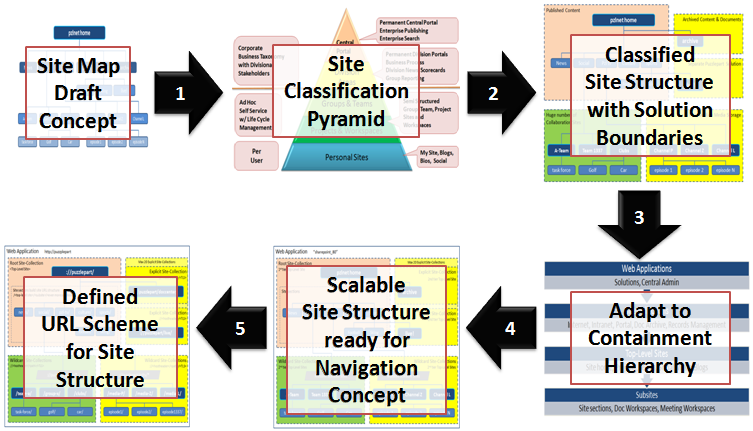

A more structured approach is needed to design a SharePoint site structure according to architectural and governance best practices. My methodology involves a process with these five steps:

  1. Review your site map draft model against the SharePoint site classification pyramid and your governance plan for each of your identified site types.
  2. Partition your sites into solution domains based on site type and governance policies aspects such as business purpose, usage patterns, storage requirements, management boundaries, information security and isolation, operations and service level agreements.
  3. Adapt the site structure to the SharePoint containment hierarchy, adhering to limits and best practices based on the partitioned solution domains.
  4. Use the main SharePoint architectural components explicit and wildcard site-collections to ensure a scalable design that allows for future growth and expansion into new business domains. Use wildcard site-collections by default as these are super scalable. Adapt or customize SharePoint global menu and current menu to your navigation concept, to hide the solution partitioning.
  5. Define your URL scheme using host headers, manage paths and site provisioning policies.
Following these five steps is a top-down approach that is more understandable for non-techies. However, from step 3 onwards, good technical knowledge of SharePoint architecture is required.


To successfully design a working and scalable SharePoint site structure, you need a site classification scheme. I recommend the classic site classification pyramid as it outlines typical solution domains with governance and site types, helping you classify sites and draw domain boundaries in your site model.


Then, after identifying the different solution domains that make up your overall SharePoint solution, you must map the identified solution domains to the SharePoint containment hierarchy. It is imperative that you understand the containment hierarchy and its boundaries, otherwise your solution will slowly stop working as more and more users create more and more sites and fill them with more and more information.


Site-collections is the main architectural component of SharePoint, in combination with the content database that stores the site-collection's content and documents. A web-application always have a single root (1st tier) site-collection, which is the home site of the web-application. A 2nd tier of site-collections can be added to the web-application as needed to scale the application, using SharePoint managed paths. A typical scenario is to add a new solution domain. Another typical scenario is to add room for more content and documents; because a site-collection cannot span content databases and adding more space thus requires a new site-collection. Use subsites for anything that is just a section of an existing solution domain or site. See the golf and car communities in the example, which functionally are "sites" in their own right. Read my post Classification and Structuring of SharePoint Sites (Part I) to learn more.


It's easy to choose what solution goes into the root site-collection of a web-application, typically this is the portal to the overall solution. As there is a limited set of explicit site-collections per SharePoint web-application, these should be reserved for a planned, wellknown small number of predefined sites. Use the limited set of available explicit site-collections for the top two types in the site classification pyramid. Note that root and explicit site-collection storage cannot be scaled as you cannot add another content database to a site collection. Use as few explicit site-collection as possible, stay well below the limit of 20 managed paths. Expect everybody to require vanity URLs such as ://puzzlepart/HR/ for their site, so a strict governance policy for 'explicit' is required.

Use wildcard site-collections when the predictable number of sites is too large for explicit, typically for the bottom three types in the site classification pyramid. Also use wildcard site-collections even for central portals and division areas when there is no absolute requirement for an 'explicit' 2nd tier top-level site. See Puzzlepart TV in the example; even if the channel sites are classified as 'division area' (yellow color code) they do not need to be 'explicit'. In fact, due to their massive storage requirements for rich media content, best practices dictate the use of 'wildcard'. Always use wildcard site-collections for solutions have a limited life span such as projects.


Finally, after composing your scalable site structure design from root, explicit and wildcard site-collections, define the URL scheme that underlies the site structure. Use short descriptive URL elements for web-applications, managed paths and site-collections. The combination of these elements become the URL of the top-level sites that are what the users actually interacts with when using SharePoint. Note how the URL structure is affected by the SharePoint containment hierarchy. Compare ://puzzlepart/pzl-tv/ and ://puzzlepart/pzltv/ in the example, the latter contains child sites of the former in the overall navigation concept. In addition, I recommend defining and enforcing policies for all URL elements that users can provision, such as subsites, lists and libraries, to avoid non-friendly URLs with anything from spaces to special characters.

It is very likely that you will need to customize the ootb SharePoint navigation provider and menu rendering to have a consistent navigation experience across sites, sections and pages. Users get very confused and annoyed when the content of the top menu changes as they navigate from site to site, which is very understandable. There are several ways to implement common menu and navigation across site-collections, but that's left as an exercise for my readers.

The capacity and planning boundaries are mostly the same in SharePoint 2010 as in SharePoint 2007 for web-applications, site-collections and content databases. The most significant change is that SharePoint 2010 now supports max 250 000 site-collections per web-application, five times the limit for 2007. The max number of content databases per web-application has increased from 100 to 300, on the other hand the max number of site-collections per content database have been reduced from 50 000 to max 5000 with a recommendation of 2000 site-collections per content database. None of these numbers are hard limits, these are numbers for acceptable SharePoint performance.

Friday, September 18, 2009

SharePoint Site Structuring: Wide vs Deep (Part II)

In my last post, I presented a SharePoint site classification & structuring scheme for realizing the information architecture (IA) structural design of your information space to facilitate content organization. SharePoint has five main content containers that can be combined to best structure the content according to your IA:
  • Root site collection: container for portal, home sites
  • Explicit site collection: container for department, services, regional sites
  • Wildcard site collection: container for team, community, project sites
  • Top-level site (site home): container for content and subsites and channels
  • Subsite (site section): container for content and even more subsites and channels
Sites always belong to one site-collection. A site-collection is just that, a collection of sites. A site-collection contains one top-level site (TLS), that again can contain a hierarchy of subsites. Hence site-collection.


Structures of top-level sites and subsites are generally labeled as wide or deep. A wide site structure uses multiple TLS sites (and hence multiple site-collections), while a deep site structure rather uses a single TLS site with multiple subsites with even more subsites. See the SharePoint site classification & structuring post for more details on this and the above five containers.

However, not all combinations are viable due to SharePoint software boundaries for the containers. This especially applies to how to combine managed site-collections with wide and deep site structures. As outlined in my last post, each major category gives a recommendation on the usage of wide and deep site structures based on the site classification. The recommendation on how to combine wide/deep with explicit/wildcard site collections is shown here (click to enlarge):


As you can see, it is not recommended to combine explicit site-collections with a wide site structure due to the limited set of explicit site-collections per SharePoint web-application. Using wildcard site-collections give the most flexibility as there is almost no limit on the number of site structures wildcard can hold. If you need a new top-level site, just create a new site-collection.

The SharePoint software boundaries on site structures per web-application is shown here (click to enlarge):


Each SharePoint web-application can hold about 20 explicit site-collections and about 50000 wildcard site-collections. About, as these boundaries are not hard limits - but performance will suffer significantly should your site structure push beyond them. The recommended limits on subsite structures is about 125 second level subsites under a top-level site, each with about 2000 third level subsites, for a theoretical maximum of 250000 subsites per site collection. Theoretical, as the maximum recommended database size per site-collection is 100GB and with hundred thousand subsites there will be little room for content in each subsite.

Note that root or explicit site-collection storage cannot be scaled as you cannot add another content database to a site collection. If scalable storage is a requirement, using wildcard site-collections is best practice.

Respect the SharePoint boundaries, and I recommend your never get close to pushing them. I once broke these recommendations myself for a wide site structure; a couple of years later the "client site" solution started behaving erroneously (mainly timeouts) because of more than 60000 clients being provisioned by then, pushing the 50000 TLS limit. The next time I designed a site structure to hold a million client sites, we did a proper information architecture LATCH (Location, Alphabet, Time, Category, Hierarchy) analysis. This resulted in a deep+wide site structure with the one million subsites (deep) hierarchically distributed based on the 9-digit customer number, across multiple site-collections (wide).

Steve Goodyear's decision diagram in the Determining Between SharePoint Site Collections and Sub-Sites post shows other important technical aspects when deciding between wide and deep.

Sunday, September 06, 2009

Classification and Structuring of SharePoint Sites (Part I)

As part of my work as a SharePoint architect, I almost always run into poorly designed and structured SharePoint solutions. Mostly because consultants hardly ever seems to read and really understand the Technet SharePoint Site Structure Planning and the SharePoint Logical Design and Architecture guidelines or do any information architecture (IA) analysis. What is needed is a site classification scheme based on solution domains, usage, management and governance as shown in this article with structuring guidelines for each site category.

This post and the next is targeted at a technical audience; if back-end architecture details is not for you, jump straight to part III for a simple five step process aimed at business users, analysts and information architects.

IA defines the structural design of your information space to facilitate content organization, realized in a SharePoint site structure to store and manage your content. Skipping the IA and site structure planning will work for some time, perhaps forever, but eventually most SharePoint solutions grows into the software boundaries of the platform. The effect will be poor performance and frustrating user experience due to the unmanageable number of sites popping up everywhere.


SharePoint supports a flexible IA structure by providing several types of content containers, and you really need to understand how to use them:
  • Root site collection: container for portal, home sites
  • Explicit site collection: container for department, services, regional sites
  • Wildcard site collection: container for team, community, project sites
  • Top-level site (site home): container for content and subsites and channels
  • Subsite (site section): container for content and even more subsites and channels
Note that it is a best practice to not use the terms "site" or "web" when classifying and structuring sites. Experience shows that these terms are so overloaded that is just causes confusion. Even the latest SharePoint guidance makes a classical MSDN mess using the term "root site" in some parts when referring to top-level sites. Also stay away from using site-definition names such as team-sites and workspaces.

In addition, I use "managed site-collection" instead of the term "managed path" to get consistent naming in my site taxonomy. Managed paths are central when constructing your URL space, but thats a secondary goal and only important as part of your IA structural design to facilitate content organization and driving findability. It is the site-collections held at managed path explicit and wildcard inclusion URLs that is the primary goal, plus of course that held at the root path.

It is important that you look at your diverse set of information and develop a classification scheme for the content that will go into your SharePoint solution. Develop a classification of sites and follow the planning guidelines on how to structure your sites according to SharePoint recommended practices. I like to classify sites into four major categories as shown here (click to enlarge):


Sites are classified into the four major categories based on the management policies (corporate to community, controlled to uncontrolled) and the life-cycle policies (predefined and planned, predictable and ad-hoc) of the site content. The four categories are numbered 1 to 4 ranging from most specific to very generic classification of sites.

Sites always belong to one site-collection. A site-collection is just that, a collection of sites. A site-collection contains one top-level site, that again can contain a hierarchy of subsites. Hence site-collection. As there is a limited set of explicit site-collections per SharePoint web-application, these should be reserved for a planned, wellknown small number of predefined sites. Use wildcard site-collections when the predictable number of sites is too large for explicit, and for ad-hoc sites that come and go in unknown numbers. Finally, there can be only one root site-collection per SharePoint web-application.

The following figure applies the SharePoint site structure design limits to my site classification scheme:


The major categories provide a recommendation of the type of site-collection to use; and for each category and site-collection type, the site classification scheme provides a recommendation for how to use top-level sites (TLS) and subsites to provide the structural IA design. There are two major ways to structure content within a site-collection: wide and deep. A wide site structure uses multiple TLS sites (and hence multiple site-collections), while a deep site structure rather uses a single TLS site with multiple subsites with even more subsites. Both approaches can be combined to best structure the content according to your IA.

Using a wide site structure is applicable for sites like projects and team-sites, as this gives the best control over site configuration, administration and management in SharePoint. Each TLS is a separate site-collection, and each site-collection is a management boundary for users and groups, access control, content taxonomy, navigation, branding, SLA, all in all sites are separated from each other and each have their own life-cycle and governance policies.

Using a deep site structure is applicable for sites like portals, departmental or regional content, and shared communities. All subsites with the TLS site-collection share the same navigation and content taxonomy, the same members and groups, the same branding, all in all the same configuration and administration and the same governing policies and life-cycles.

You will of course also need to consider the site-definition type that you plan to apply to each site, as this will influence what should be structured together to create a well planned user experience. E.g. within a internet "Publishing portal" TLS you would most likely not add a "Team-site" subsite.

Note that root or explicit site-collection storage cannot be scaled as you cannot add another content database to a site collection. If scalable storage is a requirement, using wildcard site-collections is best practice.

I recommend making a SharePoint site diagram like this to vizualize how your site structure is built by combining root, explicit and wildcard site-collections (click to enlarge):


I hope this site classification scheme will help you understand how to plan and design your next SharePoint site structure. At least it should make planning workshops more focused and less confusing, both for you and your customers.

Read part II for more details on wide vs deep site structures, including SharePoint system boundaries.

Read part III Five Steps to Structure Your SharePoint Sites if you're unsure of where to start your site classification and structuring efforts.

Tuesday, February 10, 2009

SOA: Business Event Message Models

InfoQ has published an article about SOA Message Type Architecture by Jean-Jacques Dubray. The article shows how to model 'message type' artifacts based on an enterprise common data model using a DSL, and also outlines how the modeled artifacts can be used to generate XML schemas for use in your service contracts. The message type DSL is not for modeling messages, it is just for modeling the types used as message payloads. In WCF terms, a message type is a [DataContract].

Note that even if the message type model contains a set of standardized verbs, the model does not cover business process aspects such as flow and actions. You will still need to analyze the business processes that pass those message types around to model the action, query and notification events that drive the processes. I've written several times about creating such a model that comprise both the business events and the message types, a business process information model (BPIM). I like JJ's approach; I just think that we need to model also the business capabilities and interactions that utilize the message types to get a complete set of artifacts for service contracts.

One difference is that I prefer using a common information model (CIM) as the basis for modeling the message types, rather than an enterprise data model (EDM). It is a lot of effort to create an EDM that covers all information in all systems-of-record in a company; and the moment you have completed the all-encompassing model, your CxO will inform you that parts of the business have been outsourced or that a new business will have to be incorporated, or even just that the CRM system is to be replaced. Change is the only constant. Thus I prefer starting small by creating a CIM that covers only the business entities comprised by the business processes that are about to be service-oriented. As there will be multiple resource domains in your architecture, there will be multiple CIM models as your SOA grows. Federate these domain models by creating context maps for cross-domain capabilities and logic only.

Create a CIM according to the Domain-Driven Design (DDD) principles and use the domain entity objects when implementing the business logic underlying your services. Design the BPIM based on the CIM, ensuring that the model is canonical for each process domain. As the BPIM is a projection of the CIM, the service interface messages will have an unambiguous mapping to/from the underlying domain resources (entities and aggregates). Mapping data between the message types and objects will be required in the service implementation (provider container).


The 'message type' artifacts should also be partitioned into bounded contexts according to business area as in Domain-Driven Design; where each service domain comprise a set of cohesive services based on the same underlying CIM, delivering an BPIM for the specific business domain. Having clear domain boundaries make it easier to analyze, model and design, and version the artifacts - it also aids the discoverability by the consumers by providing a clear business context for the provided services.

Your SOA solution will, as it grows, encompass multiple service domains each with its own BPIM. Composite services that compose business capabilities across two or more domains will require mediation between the message models. Even if "transformation avoidance" is considered a SOA best practice, it is unrealistic that you will be able to avoid mediation completely in your service bus (composition container). In addition, you cannot expect to enforce your model upon the extended enterprise, think of e.g. third-party and outsourced capabilities.


The message types exposed by a service domain implicitly become the "canonical schema". They enable better service discoverability, reuse and composition as they all share the same underlying data model - which also ensures that the message payloads have common semantics within the service domain. In combination with business functions, the schemas provide a complete standardized service contract.

As you have seen, the BPIM and CIM approach fits well with DDD. It also fits well with the middle-out SOA approach - including the recommendation to start small and think big picture, not big bang.

Wednesday, November 12, 2008

Service+Schema Versioning: Flexible/Strict Strategy

In a few weeks time I will be giving a session at NNUG on SOA service and schema versioning strategies and practices. A central topic will be schema compatibility rules, where I will recommend creating a policy based on the "Strict", "Flexible" and "Loose" versioning strategies described in chapter 20.4 in the latest Thomas Erl series book Web Service Contract Design and Versioning for SOA. I guess David Orchard is the author/editor of part III in the book.

I recommend using a “Flexible/Strict” compatibility policy:

  • Flexible: Safe changes to schemas are backwards compatible and cause just a point version

  • Strict: All unsafe schema changes must cause a new schema version and thus a new service version

  • Do not require forwards compatible schemas (Loose, wildcard schemas) - schemas should be designed for extensibility, not to avoid versioning

  • Service interfaces should also have a Flexible/Strict policy
Safe changes is typically adding to schemas, while unsafe changes are typically modifying or removing schema components.

Note that forwards compatible schemas is not required to have forwards compatible services, as service compatibility is defined by the ability to validate messages. WCF uses a variant of 'validation by projection' (ignore unknown) for forwards compatibility, but also supports schema wildcards.


As Nicolai M. Josuttis shows in the book SOA in Practice (chapter 12.2.1 Trivial Domain-Driven Versioning), even simple backwards compatible changes might cause unpredicted side effects such as response times breaking SLAs and causing problems for consumers. It is much safer to provide a new service version with the new schema version, as if there is a problem, only the upgraded consumers that required the change will be affected.

Note that even adding backwards compatible schema components can be risky, but adding is typically safe. Josuttis recommends using "Strict" as it is a very simple and explicit policy, but I prefer "Flexible/Strict" as this gives more flexibility and less service versions to govern.

Avoid trying to implement some smart automagical mechanism for handling schema version issues in the service logic. Rather use backwards compatibility, explicit schema versions and support multiple active service versions. In addition, consider applying a service virtualization mechanism.

Friday, June 20, 2008

CAB/SCSF: View Parameters

CAB/SCSF use the wellknown Model-View-Presenter design pattern for its views. There is, however, a design flaw in its implementation: you cannot pass parameters to the view constructor. As documenten in the SCSF knowledge base, the proven practice is to pass the parameters using the WorkItem State collection.

This proven practice can be improved using generics to become type-safe, while still adhering to the MVP design rules. Add the following new method to the WorkItemController base class in the Infrastructure.Interface project:

public virtual TView ShowViewInWorkspace<TView, TParams>(string viewId, string workspaceName, TParams viewParams)
where TParams : class
{
string stateKey = StateItemNames.PresenterConstructorParams + typeof(TView).FullName + ":" + typeof(TParams).FullName;
_workItem.State[stateKey] = viewParams;

TView view = ShowViewInWorkspace<TView>(viewId, workspaceName);
return view;
}

Then add the following new method to the Presenter base class in the Infrastructure.Interface project:

protected TParams ViewParameters<TParams>() where TParams : class
{
//NOTE: must use typeof(view instance) to get correct run-time type of generic view type
string stateKey = StateItemNames.PresenterConstructorParams + _view.GetType().FullName + ":" + typeof(TParams).FullName;
return (TParams)_workItem.State[stateKey];
}

Now you can simply pass the parameters from the module controller to the view using ShowViewInWorkspace and then get the parameters in the presenter's OnViewReady event:

_viewParameters = ViewParameters<ViewParameters>();
if (_viewParameters == null)
{
throw new ArgumentException("Required view parameter error", "ViewParameters", null);
}

This little design improvement hides the gory details of using the untyped object State collection, e.g. generating shared keys and type casting.

Wednesday, May 07, 2008

Design Rules for Model-View-Presenter

In my current project the MVP pattern is used in the supervising controller mode. The MVP pattern is an adaption of the old MVC pattern that incorporates that the capabilities of WinForms views have become smart enough to lift some of the burdens previously implemented in the controller. This applies to e.g. handling click events and data-binding; a presenter only injects the model into the view which exploits data-binding, while a controller explicitly sets the values of each control in the view. In short, a presenter should handle the use-case logic only, not the view logic.

Each view must implement an interface that defines all interactions that the presenter has with the view. This ensures a clear separation between the presenter and the view, and has the advantage of making the presenter easy to unit-test using mocking. The view never calls other modules and services directly; it must always use an event to request that the presenter provides the needed data or service.

This project uses CAB/SCSF to generate the view modules. The generated code is not quite as I would like it, I prefer that the view has no knowledge of the presenter and no direct access to it either as this gives a cleaner separation between views and presenters. I prefer that the view interface defines a set of events that is used to communicate view events to the presenter. This makes it harder for unknowledgable programmers and code monkeys to misuse the presenter reference; making shortcuts and ignoring the reasons for using patterns is very common and leads to unmaintainable code. Read Jeremy Miller's View to Presenter Communication for further opinions on this topic.

The following MVP design rules have a CAB flair, but are generally applicable to any MVP implementation:

1. All views should have a XxxView suffix: TaskView/ITaskView
2. All presenters should have a XxxPresenter suffix: TaskViewPresenter
3. Let the presenter do all use-case processing, but keep GUI control details in the view
4. All presenter methods called by the view must start with OnXxx() as they are events by design (MVP)
5. Calls from the view to the presenter should be kept at an absolute minimum, and used for "event" type calls only: _presenter.OnViewReady();
6. It is FORBIDDEN to use the presenter reference to access the model or services directly, no return values from presenter methods
7. Calls from the presenter to the view MUST go via the interface only
8. No methods in the view shall be public unless they are defined in the interface
9. It is FORBIDDEN to access the view from anywhere but the presenter, except for loading and showing the view from the CAB ModuleController
10. The interface methods shall have long meaningful names (not "SetDataSource") based on the domain language of the use-case
11. The interface should contain methods only, no properties - afterall the presenter drives the use-case by calling methods, not by setting data
12. All data in the MVP component should be kept in the model, no data should exist only as properties of UI controls
13. The methods of the view interface should not contain UI control name references (e.g. AddExplorerBarGroup) as this makes the presenter know too much about the implementation technology of the view
14. Stick with domain naming in the view methods (e.g. AddTaskGroupHeader), this makes the code easier to understand and the tests self-describing

Rule 11 and 12 might surprise you if your perception of the model is that it contains business entities only - traditional database-driven design thinking. The model is rather business process documents that are involved in the use-case, i.e. domain entity and value objects. Even views used for searching have a model, it is a specification or query object. Jeremy has some guidelines on assigning responsibilities in MVP.

Rule 6 helps adhering to the "tell, don't ask" principle - properties make it far too easy to ask, rather use methods on the view to tell it what to do. I've seen design-time view data-binding directly against presenter properties, not exactly separation of concerns. Neither is it very testable, as there is no interaction from the presenter through the view's interface when the view asks the presenter directly. When mocking the view, there will be no recorded / testable interaction.

Using long meaningful names in the view interface has the nice side-effect of making the presenter unit-tests a kind of mini documentation.

I wish there was a FxCop Contrib project on CodePlex like for EntLib, CAB/SCSF and ASP.NET MVC. Then maybe I would write and publish some of these MVP design rules as custom FxCop rules.

Thursday, April 17, 2008

WCF: Design of Client Domain Objects

The client Domain Objects [Evans] (aka business entity - BE) must be related to the data contracts provided by the web-services. Still, they will need to be enhanced with e.g. dirty-tracking, validation, state, property conversions (xs:date), business rules, and other aspects needed to produce a fully working client application. This article describes how to achieve this when sharing domain objects across layers is not an option (i.e. interop with JEE services), and the same applies to AOP.

There are two models for this: annotating the BEs with XML serialization attributes to decorate the WSDL data contract, or creating separate Mapper classes [Fowler] in addition to the BE classes. The mapper will then map to and from the service proxy DTO objects [Fowler] at run-time. Note that the mapper model will be required whenever the BE is significantly different from the data contracts. Thus, BEs should be implemented using the first model to the maximum extent possible, only using the second model for advanced mapping requirements.

The decorator option is easier, performs better, and gives less code to maintain - but requires knowledge of XML serialization and will not give compilation errors when the data contract changes (even if the proxy is updated). Good integration test coverage is needed to make this option viable, i.e. to detect that the DTO's XML payload has changed.

Easier, less code: Only one BE class to implement and maintain as the BE is a Decorator object [GoF] wrapping the "DTO" XML. Note that there is no auto-generation of these classes and that there are no mappers or DTO objects. The BE classes are shared directly by the service proxies.
Performs better: There will only be one de-serialization step directly into the BE because it wraps the XML directly. This also applies to any nested child objects and collections - there will be no looping code to create and map the BE structure. The same applies to sending BE objects to the services - they will be directly serialized into "DTO" XML.
Contract change risks: As the BE classes are not auto-generated from the data contracts, changes to the contracts will not be automatically reflected in the serialization attributes on the BE properties. As (de)serialization happens at run-time, any mismatch between the XML and the serialization attributes cannot be detected by the compiler. Thus, adequate integration tests are required to detect that BE properties are not being set/read during (de)serialization. Breaking data contract changes will require that the serialization attributes are updated accordingly.

The mapper option is also quite easy, but performs worse and requires more code to be implemented and maintained (two classes: BE and mapper). However, it requires no knowledge of XML serialization and it will give compilation errors when the proxy + DTO objects are updated after data contract changes. Note that good unit testing is required to ensure that the mappings to and from the DTO objects are correct, including the complete object graph (nested child objects and collections).

Quite easy, more code: Two classes to implement and maintain, one BE class and one related mapper class. The mapper class must cover nested child objects and collections, both to and from the DTO objects. The DTO objects are auto-generated and will never be manually maintained by developers.
Performs worse: In addition to the de-serialization step of the DTO objects, the service agent must execute the mapping code to fill the BE object with data from the DTO object. Add to this extra transformation looping through nested child objects and collections, and the performance gets proportionally worse with the complexity of the object graph.
Contract change risks: The DTO objects are auto-generated based on the WSDL and are thus always in synch with the data contracts. Any breaking changes to the DTO classes will cause the mapper classes to give compilation errors. Breaking data contract changes will require that the mapper classes are updated accordingly - both to and from the DTO classes.

To complement this BE design approach, read the programming models for the Decorator option and the Mapper option to learn about the technical details and issues of each option.

Wednesday, April 16, 2008

WCF: Client Domain Objects, Decorator Pattern

The client domain objects (aka business entity - BE) must be related to the data contracts provided by the web-services. Still, they will need to be enhanced with e.g. dirty-tracking, validation, state, property conversions (xs:date), business rules, and other aspects needed to produce a fully working client application. This article describes how to achieve this when sharing domain objects across layers is not an option (i.e. interop with JEE services), and the same applies to AOP.

One option for implementing the BE objects, described in this article, is to apply the Decorator pattern to the WSDL scema-based DTO objects to enhance them into full-fledged domain objects. Read ‘
Design of Client Domain Objects’ for an intro this option and the related Mapper option.

If you do not like this Decorator option due to the weak [XML attribute] link to the data contracts (see end of article), you can always use a derived decorator class instead of a partial class. Make all your BE enhancements in the derived class using a combination of DTO overrides and new domain logic. If you prefer explicit, debuggable code, you're better off using the Mapper option.

Service Proxy

Use the SVCUTIL.EXE /REFERENCE switch when generating the proxy code and messages to reuse your BE objects as DTOs and to avoid getting new, duplicate DTO objects generated (might not compile due to name clashes). Alternatively, just remove the DTO code from the generated proxy. Make sure that the proxy code reference the .NET namespace and interface assembly that contains your BE objects.

Business Entities

You can use the data contract DTO objects generated by SVCTIL.EXE /DCONLY to get started. This will give you data-binding enabled (/EDB) anemic entity objects with all the properties in place, annotated with XML serialization attributes. Just ensure that the output files from SVCUTIL.EXE do not overwrite your code. The DTO objects become your generated BE objects - ready for decoration.

The BE objects must be manually maintained whenever you make changes to the generated BE code, e.g. to add EntLib3 validation attributes on the properties. Keep your additions to the generated BE in a partial class as far as possible, e.g. add new properties and methods in a partial class extending the decorated class. If all your decorator code can be isolated into a partial class, then the generated BE code can be re-generated without losing your extended BE code.

Our programming model for decorator-based client domain objects is based on using two partial classes; one T.schema.cs class file for all code based originally on the data contracts, and one T.cs class file for all added aspects. T is the type name of the BE.

Note that BE constructors will not be called during deserialization. Create a method to be used as a surrogate constructor to be run after deserialization and mark it with [OnDeserialized]. This is a good place for resetting e.g. the dirty flag:

[OnDeserialized]
void DeserializationCtor(StreamingContext context)
{
_isDirty = false;
}

Your BE class must still have a constructor to initialize the object for normal use. The constructor must initialize all properties that must have a defined initial value. In addition, the c'tor must initialize all child objects that are exposed as (de-normalized) public properties, to avoid null reference exceptions when using the BE (make it simple to use the BE). This also applies to child collections; create the collection to make it ready for use.

public NominationType()
{
//NOTE: WILL NOT BE CALLED ON DE-SERIALIZATION
//initialize all normalized valueobjects with members
this.NominatedValueField = new UnitValueType();
this.NominatedValueField.Unit = String.Empty;
}

Also initialize all fields that are required by the XSD schema, failure to initialize these fields will give serialization errors:
[DataMemberAttribute(IsRequired=true, . . .) ]

Don't break the DRY principle by adding the value object initialization code multiple places.

Dirty Tracking

If your BE implements INotifyPropertyChanged to enable data-binding, then the event is a good place to add dirty-tracking: Simple Dirty Tracking in Domain Objects

Converting XML Data Types to/from Strongly Typed Properties

Note that xs:date becomes string in .NET as there is no Date only type, just DateTime. Do not let this kind of weak type design leak into your BE objects. Contain the weak typing inside your BE object by converting to/from strongly typed properties.

private string _demandDateData; //XML xs:date datatype

public DateTime DemandDate
{
get
{
return DateTime.ParseExact(this._demandDateData, WSDateFormat, null);
}
set
{
string xsDate = value.ToString(WSDateFormat);
if (this._demandDateData.Equals(xsDate) != true)
{
this._demandDateData = xsDate;
this.RaisePropertyChanged("DemandDate");
}
}
}

This keeps your BE object within the "Simple vs Easy" principle.

De-normalization of BE Value Objects

The data contracts provided by the web-services will most likely contain some DDD value objects for numeric types annotated with some related attributes (e.g. money with currency) and other similar cases. These value objects will become child objects of the BE object, which is not very data-binding friendly as most controls (grids, etc) needs the data to be non-nested properties of the bound object. In addition, one control can only have one binding source. Thus, unlike master-details type binding that can be resolved using multiple binding sources, nested value objects must be de-normalized and projected as normal properties directly on the BE objects.

Start by making the value object private and give the property a new name (e.g. suffix with Data) while specifying the original name in the serialization attribute to keep the link to the XML. Keep the RaisePropertyChanged parameter equal to the property name.

[DataMemberAttribute(Name = "NominatedValue", IsRequired = true, EmitDefaultValue = false, Order = 2)]
private UnitValueType NominatedValueData
{
get { return this.NominatedValueField; }
set { . . . }
}

Then create the de-normalized public properties (in a partial class) as required by the BE and data-binding needs. The new public properties should be wrappers exposing an element of the original private member value object, using a friendly name and the correct data type. Make sure that the new-old value comparison is correct. Keep the RaisePropertyChanged parameter equal to the new property name.

public Decimal NominatedValue
{
get { return this.NominatedValueField.Value; }
set
{
if (this.NominatedValueField.Value.Equals(value) != true)
{
this.NominatedValueField.Value = value;
this.RaisePropertyChanged("NominatedValue");
}
}
}

public string NominatedValueUnit
{
get { return this.NominatedValueField.Unit; }
set { . . . this.RaisePropertyChanged("NominatedValueUnit"); }
}

As can be seen from the example, the new public properties are named by concatenating the value object name and the exposed property name; except for when the property name is just repeating the last part of the value object (i.e. NominatedValue.Value).

Remember to initialize all the value object children in the BE c'tor; both create the child objects and set their initial values.

Keeping the BE Synchronized with the Data-Contract Schema

It is imperative that the XML serialization attributes in code are correct according to the data contract XSD when using the decorator approach on proxy DTO objects to implement BE objects. There are three typical changes that can break the mapping between the BE code and the payload XML:

  • Changes to the code by renaming properties without updating the XML serialization attributes accordingly
  • Changes to the data contract XSD schema without adding properties with correct XML serialization attributes
  • Changes to the data contract XSD schema without updating the XML serialization attributes accordingly
The first issue can happen when e.g. re-exposing a property by renaming and hiding the original property (such as for de-normalizing a value object). This will require updating the XML serialization attribute to keep the mapping of the code to XSD correct:

[DataMemberAttribute(Name = "NominatedValue", . . .) ]
private UnitValueType NominatedValueData

The next two issues are caused by adding new items to the data contract or changing some existing items. The latter is not recommended and is definitively not a recommended practice for published contracts:

  • It is a proven practice that published contracts are not changed, except for non-breaking changes in minor versions.
  • For new, non-breaking versions of the contract, items must only be added at the end of the existing contract.
When a new minor version of a published data contract must be incorporated into your BE class, then start by adding the properties to hold the new data items, then add the applicable XML serialization attributes with the correct sequence order value:

[DataMemberAttribute(. . . , Order=<order number in XML xs:sequence element for item>) ]

For new major versions of data contracts, you must consider creating a new version of the BE class in a new .NET namespace. This allows you to do controlled versioning of your domain objects in synchronization with the versioning policy of the service contracts.

However, during the development of the web-services, the contracts are bound to get breaking changes as the data contracts evolve (which is OK as they are still not published). For this reason, wait as long as you can to make changes to the generated BE code, stick to working on the partial class used to decorate the BE. This will allow you to re-generate the schema-bound parts of your BE to keep up with the changes in the data contracts.


A side note: deriving your BE objects from the DTO objects is an alternative to partial classes that strictly enforces the separation of decorator code from generated code, and allows the generated code to be auto-generated over and over again - like for the Mapper option. Alas, there are drawbacks to inheriting the DTOs also, as none of the generated proxy artifacts are geared towards this. Look into using an AOP framework to do dynamic subclassing if chosing to derive your BE objects.

For data contracts under development, any combination of adding, changing, removing and reordering of data contract items can be expected to occur. The XML serialization attributes must then be updated accordingly.

Monday, April 14, 2008

Simple Dirty Tracking in Domain Objects

This article shows how to add dirty-tracking to domain objects (aka business entity - BE) by changing their code and adding a public bool IsDirty property. This design is simple and intrusive, and is best suited when you have to implement your BE objects yourself anyway. It requires no usage of BE interfaces, deriving and overriding, AOP, nor any DI-container.

If you cannot change the BE code, then consider implementing non-intrusive logic to compare a unit-of-work BE with its original values; either by reading the original BE from the repository and perform a recursive Equals(originalEntity) check of the BE's object graph, or by using an extended identity map that has original copies of the unit-of-work BE objects and performing the same Equals(originalEntity) check. The latter approach is better for client-side dirty-tracking; while the former is better suited for server-side implementations (get - compare - save).

Never implement dirty-tracking in client applications by using click events and the like, to set the dirty flag from view or presenter code. Implementing dirty-tracking in client code breaks both the SRP and DRY principles, first by making dirty-tracking a responsibility of the view/presenter instead of the BE object, and then by repeating dirty-tracking code across all places where the BE object is used.

If your BE objects implements INotifyPropertyChanged to enable data-binding, then the event is a good place to add dirty-tracking. Note that this dirty-tracking mechanism depends on all changes to the BE state being done through the property setters. Luckily, the _isDirty flag can also be set directly from anywhere within the BE code if necessary.

protected void RaisePropertyChanged(string propertyName)
{
//NOTE: must be here to run even if no handlers are registered
this._isDirty = true;

PropertyChangedEventHandler propertyChanged = this.PropertyChanged;

if (propertyChanged != null)
{
propertyChanged(this, new PropertyChangedEventArgs(propertyName));
}
}

If your BE is a DDD "aggregate root" and thus contains a complex object graph, then your BE should implement an IsDirty method, in addition to the private _isDirty member, that iterates through all child objects and checks their IsDirty status. Each object within the aggregate root must implement its own dirty tracking mechanism; either as just an IsDirty property for simple objects, or both an _isDirty flag and an IsDirty method for iterating its children also for complex objects.

public bool IsDirty()
{
if (this._isDirty) return true;

bool isDirty = this._isDirty;
foreach (Allocation allocation in _allocationList)

{
if (allocation.IsDirty) isDirty = true;
break;

}
return isDirty;

}

You could add event handlers to listen for the INotifyPropertyChanged event from contained child objects, but this is not recommended as you would need to add and remove a dynamic number of event handlers based on how many objects there are inside the aggregate root throughout its complex object graph - also when objects are added or removed from child collections.

Thursday, April 10, 2008

Simple vs Easy Revisited

New client, new project, new developers - same old story on code monkey approach to designing and implementing objects.

I am again gently enforcing these two simple rules:

The objects must be simple to use, not (just) easy to make. E.g. do not expose a date as string even if XML xs:date types becomes strings in .NET and strings are easy to code for you - rather make it simple to use the object by converting the string to and from a real .NET DateTime value.

There is no such thing as "throw-away code" if it enters the source control system. You will not have time, due to time preasure, to come back at a later time to do things right in throw-away code that you write due to time preasure. Therefore all code that you check-in must be production quality code.

In addition, I try to enforce this principle: There should be no green code (comments) in the code. All comments should be considered a missed opportunity to use 'Refactor - Extract Method' and use of the comment as the basis for the new method name.

Wednesday, January 30, 2008

Ontology for Business Processes, SOA and Information Models

I have for a long time promoted that you should apply a specific kind of information model (the business process information model - BPIM) when composing services into business processes in service oriented solutions. A BPIM models the messages for the business events that drive the business processes. The main goal of this information model is to enable coordinated loose-coupling (semantic mediation) between the services at the composition level.

There has been a lot of discussions on how the BPIM relates to SOA services and the common information model (CIM), and how the BPM process layer relates to the SOA process layer. In the following ontology I have tried to model the relationships between the documents and the domain objects, Shy Cohen’s service taxonomy & ontology, and Jean-Jacques Dubray’s SOA+BPM ontology

The service classification scheme has the "hierarchy" taxomomy form. It is not a scientific hierarchy nor a tree form, thus there is no "is using" or "is dependent on" relation between the services - it is just a classification scheme. There can be no dependency between services in SOA except for composite services realizing a business process by consuming the actual services. Taking a dependency on another service will break the central "services are autonomous" tenet of SOA.

Click to enlarge the ontology:

Note how there are processes at two levels in the model: the event-driven resource lifecycle processes for domain objects (bottom), and the human-driven business processes realized as composed services (top). These two levels are separate bounded contexts with well defined mappings between them: the business process domain and the resource lifecycle domain.

The BPIM is applied at the business process domain level (orchestrations / composites / sagas), while the services operate on the domain objects in the CIM to manage the lifecycle of these resources in accordance with the business events.

Note that the BPIM is related to, and is a subset of/reference to, the resource domain objects in the common information model (CIM). In addition, the messages covers more than just activity data, they also contain queries, notifications (events) and commands. This in like a mail order paper form that contains e.g. some customer data and references to product data. The word "subset" is central, e.g. the “customer has moved” action event has a BPIM document that contains the data pertinent to that specific business process event, not the complete schema of the customer domain object. The resource process service used to act on the “customer has moved” event does of course operate on the actual domain object, but this is invisible to the human workflow process.

The business process messages (action, query, notification) driving the composite services and the resulting business events are central artifacts when designing the services and the information model. I am a strong believer in designing a service-oriented solution by applying "EDA style" thinking to avoid missing out on the events and their documents due to traditional “invoke operations” SOA thinking, getting too much focus on business process flow.

An aspect not shown in the model is that the need for agility increases towards the top, while the cost of change increases towards the bottom. This is an important argument for having processes at two levels; it allows you to contain the frequent changes to the business processes (mashup style compositions) and composite services rather than having to constantly make changes to the services themselves, which could become very costly as the number of service subscribers increases over time. This is something that your business people should readily appreciate.

Design your system to have flexibility in the flow of the business processes and composite services. The diamonds of your business process are the business decisions, and this is where you should implement a business rules engine (BRE) mechanism. Process flow logic is not service business logic, avoid leaking domain logic into the orchestration layer at all cost.

Finally, the model show how claims relate to services at all levels. I have done this to show how a claims-based security model is a cross-cutting concern throughout a service-oriented solution. I strongly recommend designing in process claims right from the beginning, as this makes it easier to learn how access control relates to the business processes and solution domain.

Master Data Management (MDM) relates to the "Resources" in the above ontology. It is imperative that you apply a MDM strategy to your enterprise resource domain objects to avoid inconsistencies and multiple versions of the truth.

I hope this ontology makes my viewpoint on business process driven SOA clear to you. Feel free to comment on this model, and also check out the six figures in JJD’s ontology for models showing different perspectives of resource lifecycles & business events, BPEL, BPMN and human tasks.

See also this related post.

Thursday, March 01, 2007

WCF: Validating Message and Data Contracts using VAB

Last year I wrote about how we used a 'broken rules' engine and the Noogen validation component for doing validation across all layers including the business logic and the WinForms client. Using a validation engine allows for better design and separation of concerns in your components, and makes the code easier to understand as the validation logic is clearly separated from your domain logic.

These days I have started to use the Validation application block (VAB) from the upcoming Enterprise Library 3 provided by the patterns & practices team at Microsoft. VAB works just like our custom 'broken rules' engine, it allows you to declaratively add validation rules as [attributes] to your objects instead of implementing the rules as code; and then passing an object instance to the Validation.Validate() method to interpret the declared rules and provide a list of those rules that are broken, i.e. the rules that the object instance does not comply with.

The nice feature provided by VAB is that you can actually completely separate the validation rules from your domain logic code by allowing you to declare the rules in an external XML config file instead of adding [attributes] on your domain objects. It is really nice as there is a VS2005 editor tool that allows you to create and edit the rules instead of hand-coding XML. The figure shows how easy the editor makes it to e.g. choose which objects and properties to validate (click to enlarge):


Remember to set the "default rule set" property for each type/class that you add. Forgetting to set it will give no warning, but neither will your rules be applied unless you actually specify a rule set name in the call to
Validation.Validate() (more on this problem below).

By having the validation rules in config, you can actually modify the rules without having to recompile and redeploy your solution to keep up with the ever changing business requirements.
Read more about this and other VAB features at David Hayden's blog. Also read his four part VAB introduction series to see some code.

I use VAB to validate the incoming message and data contracts of our WCF service. I have decorated all the message and data contracts with VAB attributes in addition to the WCF attributes. This allows for validating just only a single data contract or for validating the complete structure of a message including contained data contracts. The capability of validating an object graph in a single operation is what I love most about VAB. These are the object graph validators:
  • [ObjectValidator] is for validating a composite child object of the current object
  • [ObjectCollectionValidator(typeof(...))] is for validating a collection of child objects
Combine the object validators with the [NotNullValidator] to make the composite objects required. Note that there seems to be a bug in the current VAB beta when using the collection validator on recursive structures (e.g. folders containing folders), your app-domain will just silently die. [UPDATE] More about this bug here.

All messages derive from a common base class that ensures that all messages contain the same set of [MessageHeader] info required by our service. This allows us to validate all messages using a single method:

public static void ValidateMessage<T>(T message)
where T : DefaultMessage, new()
{
ValidationResults results = Validation.Validate(message);

//NOTE: DO NOT EXPOSE IMPLEMENTATION DETAILS
if(results.IsValid==false)
{
FaultContracts.DefaultFaultContract fault = new FaultContracts.DefaultFaultContract();

fault.ErrorId = (int)EApprovalErrorCode.InvalidMessage;

fault.ErrorMessage = Utilities.MakeDetailedErrorMessage(results);

throw new FaultException<DefaultFaultContract> (fault, new FaultReason(InvalidMessageReason));
}
}

Note that as VAB uses generics in the
Validation.Validate(<T>) method, the code must ensure that type fidelity is not lost before calling the method. I.e. you must use a generic <T> type input and not the base class DefaultMessage in your message validator method input. The problem by using a base class type input is that even if you pass a derived class at run-time, the compile-time type will be used to deduce the validation rules - thus only the base class will get validated.

Using VAB gives us better control over the validity of the input than the DataContractSerializer is able to provide. E.g. it allows for checking string lengths and controlling that string elements are actually not just empty values; and validating e-mail addresses, guids, etc; rules that cannot be expressed using WCF attributes. These are some of the field level validators:
  • [NotNullValidator] ensures that required fields are not null; just got to love this, no more String.IsNullOrEmpty() checks in my domain logic
  • [StringLengthValidator(min, max)] controls the string length; must be combined with [IgnoreNulls] for non-required strings; no more 'field would be truncated' exceptions
  • [RegexValidator] validates the field against a regular expression; useful for validating e-mail addresses, phone numbers, guids, etc.
  • A guid validator example, with optional { and }: [RegexValidator(@ "^(\{){0,1}
    [0-9A-F]{8}\-[0-9A-F]{4}\-[0-9A-F]{4}\-[0-9A-F]{4}\-[0-9A-F]{12}
    (\}){0,1}$", RegexOptions.IgnoreCase)]
  • E-mail validator for 99% of all the possible formats: [RegexValidator(@ "^[A-Z0-9._%-]+@(?:[A-Z0-9-]+\.)+[A-Z]{2,4}$", RegexOptions.IgnoreCase)]
Note that you must apply the validators to public class members only; validators on private class members will not be interpreted, and neither will they cause an exception.

Validators can be composed into Boolean expressions using [AndCompositeValidator] and [OrCompositeValidator]. In addition, there are plans to provide cross-property validation in the final release of the validation application block. This will allow for comparing class members against each other instead of just literals, values sets and type/conversions. Sometimes, however, this is not sufficient for complex rules.

When your rules are too complex to be supported by the standard validators, VAB allows you to do self validation by providing [SelfValidation] methods:

[HasSelfValidation]
[MessageContract]
public class ImportProjectDocumentsMessage : DefaultMessage
{
[SelfValidation]
public void ValidateFileXorData(ValidationResults results)
{
//XOR operation
if ( (_fieldRootNode == null ^ String.IsNullOrEmpty(_fieldImportXmlFilename) ) == false)
{
results.AddResult(new ValidationResult("One of the parameters ProjectDocuments or ImportXmlFilename must be specified", this, "ImportProjectDocumentsMessage", null, null));
}
}
. . .
}

All classes containing self-validation must be marked with the [HasSelfValidation] attribute. VAB allows you to mix standard validators with self-validation. You just got to love this kind of flexibility.

Note that as there will be no exceptions if your validation rules are not interpreted by VAB for some reason (such as the above lost type fidelity problem, missing "default rule", etc), I recommend hard-coding one of the rules in your logic to ensure that such mishaps are detected during development and testing. This fail-safe can be enclosed in #if DEBUG so that it is not included in your final solution. Regardless, you should always have a unit-test expected to fail when validating; if the test does not fail, you know that the rules are not being interpreted. Use [ExpectedException] or Assert.IsFalse() to verify that invalid input actually causes the validation to fail.

Download the EntLib3 Feb2007 CTP beta including VAB from CodePlex. Read the documentation and check the 'quick start' samples to get started.

[UPDATE] Watch the 'Taking Advantage of the Enterprise Library in Your Site' web-cast for an introduction to EntLib3.

[UPDATE] Watch the 'New Capabilities in Enterprise Library 3.0' web-cast for even more details about the new features in EntLib3.

Another part of enterprise library 3 to look forward to, is the Policy Injection block. Read more about PIAB at Tom Hollander's blog. This looks good for adding cross-cutting concerns such as logging and exception handling to the domain logic without actually modifying the logic to add non-domain stuff. Alas, this is in fact just 'aspect oriented programming' (AOP) under a new name - read Patrik Löwendahl's comments and the response from the p&p team at his blog.

[UPDATE] Also check out the new WCF stuff in the Orcas March CTP: integration of WF and WCF with new activity types and a new WorkFlowServiceHost; plus JSON endcoding and webHttpBinding for better REST + POX/JSON support.