Wednesday, June 14, 2006

Model Reference Data = Observer pattern + Reference Data + MVP (Part II)

In part I, I outlined how we use common business process reference data (BPRD) in our WinForms user controls contained in a model-view-presenter application. Before the refactoring, the presenter was used to hold and provide the data, and also had the responsibility of notifying the applicable views that the reference data had changed. This lead to a rather unreadable and unmaintainable design as the set of events and views got bigger

All who have developed a tabbed wizard control know that using a common data object shared between all the tabs is a good design. The refactored design is analogous to this, in addition to employing the Observer pattern. The WinForm user control container module described in Part I is just an advanced, decoupled MVP implementation of a multi-tabbed user interface module.

The refactoring of the module comprises these steps:
1. Extract all common reference data into a new ‘subject’ class as private members.
2. Expose the reference data as public properties.
3. Add event definitions to the applicable properties to notify ‘observers’ of changes to the ‘subject’.
4. Add a property to the presenter to hold an instance of the new BPRD object type.
5. Add a property to the view interface, of the new BPRD object type.
6. Add code in the presenter to create an instance of the reference data (BPRD).
7. Add code in the presenter to set the BPRD property of each of the views.
8. Add event handlers in the presenter and views (observers) to subscribe to applicable notifications from the new BPRD object.

In the new design, all views hold a reference (pointer) to a common, shared instance of the BPRD object. They all change the common object and they all can subscribe to whatever event they need to get notified of. Thus, the presenter need not contain any code to handle BPRD events to then invoke methods on the views. This leads to a much simpler presenter. The views are also somewhat simpler, as the view interface now contains less to implement.

The refactored view interface looks like this:

public
interface IEkspederingView

{

//note how all the get/set events from part I are gone

//property pointing to the current common, shared BPRD

EkspederingFellesData GjeldendeEkspederingFellesData{get; set;}

...

}


The new business process reference data class looks like this:

public class EkspederingFellesData

{

public EventHandler<EventArgs> KontonummerSatt;


public string Kontonummer

{

get { return _kontonummer; }

set

{

_kontonummer = value;

//subject: notify subscribers of change

if (KontonummerSatt != null) this.KontonummerSatt(this, new EventArgs());

}

}

private string _kontonummer;

...

}


The presenter looks like this:

public class EkspederingPresenter

{

public EkspederingPresenter()

{

//create and load the BPRD

_currentReferenceData = new EkspederingFellesData();


//add the current BPRD to all the views

_innbetalingView = new InnbetalingView();

_innbetalingView.GjeldendeEkspederingFellesData = _currentReferenceData;

}


public EkspederingFellesData GjeldendeEkspederingFellesData

{

get { return _currentReferenceData; }

}

private EkspederingFellesData _currentReferenceData;


private InnbetalingView _innbetalingView;

...

}


And finally, one of the views looks like this:

public class InnbetalingView : IEkspederingView

{

public InnbetalingView()

{

//observer: add event handlers to subscribe to notifications to BPRD

this.GjeldendeEkspederingFellesData.KontonummerSatt += new EventHandler<EventArgs>(OnKontonummerSatt);

}


public EkspederingFellesData GjeldendeEkspederingFellesData

{

get { ... }

set{...}

}


public void OnKontonummerSatt(object sender, EventArgs e)

{

//do function X13

}

...

}


The reference data value object is the ‘Subject’ of the Observer pattern, while the ‘Observer’ objects are the presenter and (possibly) the views. Thus, the reference data ‘Subject’ object (don’t get confused) is in fact a ‘Model’ object, although not a domain object such as a customer or an order.

If this combination of the observer pattern, the MVP pattern and a reference data object should have a name, I would call it the “Model Reference Data” pattern, the subject/model being the common, shared and observed reference data.

[UPDATE] Martin Fowler has since retired MVP and replaced it with the Supervising Presenter pattern. The new pattern is actually very like our adapted MVP usage, as it fits better with WinForms data binding.

Friday, June 09, 2006

Tell, don’t ask – MVP – Biz Process Reference Data (Part I)

A good programming practice is “tell, don’t ask, which concerns class responsibility (btw, don’t try to apply this practice at home with your wife…). In these postings, I will outline how we use this rule to avoid excessive use of events in a model-view-presenter (MVP) WinForms module to get at the reference data of the current business process.

Reference data
is used in the model to annotate the business transaction work item data with extra information such as the customer number, account number, zip code, country, etc.

I have successfully used “tell, don’t ask” to refactor code that used events to get business process reference data (BPRD) values stored in a WinForms presenter control, to use a common, shared ‘current reference data’ object to contain and control the reference data. This also leads to a better design that follows the “single responsibility principle
and leads to better cohesion / separation of concerns in the presenter and the current-reference-data classes.

The WinForms module consists of a container user control that hosts a set of child user controls inside a tab control. In fact, one of the child controls is it self a tabbed container with further child controls. Before the refactoring, the reference data was stored in the presenter, much like the view-state data of the presentation-model
. Note that we use an adapted version of MVP due to our extensive use of WinForms databinding. Note also that we by constraint cannot use CAB in this project.

See J Aron Farr’s post at JadeTower
on ‘MVC, MVP, Presenter Model for more info about the different presentation logic patterns.

The old code contained several events for getting and setting the reference data defined in the view interface (one event pair per value). The child user controls (the views) would raise an event that the presenter would handle to provide the requested reference data value. Thus, a view would need ask for the data to get it and beg for the presenter to change it. After all, raising an event is not dictating (tell) something to happen, it is more like pleading (ask). This coding style started out small with just one value to get.

An example view interface (sorry about the Norwegian naming imposed on me):


Public Interface IKasseEkspedisjonView

#Region "Events"
Event KontonummerHent as EventHandler(Of GenericEventArgs(Of String))
Event KontonummerSett as EventHandler(Of GenericEventArgs(Of String))

Event BuntnummerHent as EventHandler(Of GenericEventArgs(Of Integer))
Event BuntnummerSett as EventHandler(Of GenericEventArgs(Of Integer))

Event EkspedisjonsnummerHent as EventHandler(Of GenericEventArgs(Of Integer))
Event EkspedisjonsnummerSett as EventHandler(Of GenericEventArgs(Of Integer))
#End Region

...


End Interface


The presenter would handle these events both to provide and to update the BPRD values stored in the presenter.


Note that I do not want the views to have a pointer/reference to the presenter. In addition, to keeps things simple, the container is also the presenter. The container naturally has pointers to all the views, added automatically by the Visual Studio designer when adding the child user controls to the tab control.

The events defined in the view interface had to be implemented by all child user controls using BPRD, and even using a user control base class to implement the events only once, it still would lead to a growing number of events and handlers as the number of reference data values increased. Likewise, the presenter would have to add handlers for each new event and for each new child user control added to the container.

It was time for a simpler solution to sharing the business process reference data. The refactoring involves creating a new value object to keep all the reference data and removing all of the get/set events from the view interface in favor of property changed events on the value object. The refactoring will also remove the need for the presenter to subscribe to BPRD events for each view instance.

Stay tuned for details about the refactored business-process-reference-data object in the upcoming part II.


[UPDATE] Martin Fowler has since retired MVP and replaced it with the Supervising Presenter pattern. The new pattern is actually very like our adapted MVP usage, as it fits better with WinForms data binding.

Wednesday, June 07, 2006

Using DbConnectionScope with Suppress TransactionScope

We have been using the ADO.NET team's DbConnectionScope manager for a few months now, and it really makes the 'stay LTM' mechanism quite effortless. There are, however, a few pitfalls to avoid, especially when using it inside a TransactionScopeOption.Suppress block.

Yesterday I spent a few hours tracking down a "Transaction Timeout / The transaction has aborted" exception in a new business process method that combined several existing methods. By running the applicable unit tests, I knew that all the methods used in the new process were working correctly, so it had to be the combination of transaction scopes that caused the error.

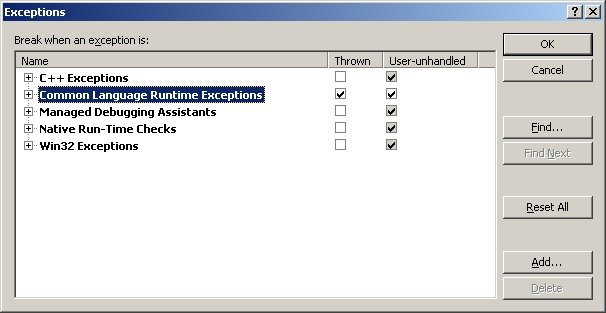
I turned on the 'Break when an exception is: CLR exceptions: thrown' (Debug-Exceptions in the VSTS main menu) to pinpoint the bug:
... and this lead me to a transaction suppress block that used the the current connection of the DbConnectionScope like this:

Using noTransx As New TransactionScope(TransactionScopeOption.Suppress)
...
Try
Me.ReadDataNoLock()
Catch ex as TrioKasseException
'ignore error, as no record found is OK in this method

End Try
...
noTransx.Complete()
End Using

Sub ReadDataNoLock()
...
ta.Connection = DbConnectionScope.Current.GetOpenConnection(...)
...
Throw New TrioKasseException(...) 'record not found
...
End Sub

To make a long story short, this code reuses the connection of the outer required block to perform a non-transactional read inside the suppress block; and the code causes an exception to be thrown and handled during the connection usage. This causes the next attempt to aquire a handle to the "required" transaction context to fail with "transaction has aborted". The fix for this exception is to avoid the connection reuse by forcing a new connection:

Using noTransx As New TransactionScope(TransactionScopeOption.Suppress)
Using dbconn As New DbConnectionScope(Of SqlConnection)(DbConnectionScopeOption.RequiresNew)
...
...
End Using
noTransx.Complete()
End Using

Takeaway: If you use a .Suppress transaction block inside a .Required transaction block, always use a .RequiresNew companion DbConnectionScope block to ensure that you do not reuse a connection across transaction blocks.

VB.NET multi-assembly .config settings

The new 'Settings' mechanism of VB.NET 2.0 and the related My.Settings object make it convenient to add new settings and to access the configuration settings from code as strongly typed data.

To bad that the project 'Settings' property page does not show e.g. <connectionStrings> settings imported (copy-paste) into the "Syden.Trio.ClientApp.exe.config" file from the config files of other assemblies, such as the typical "Syden.Trio.DataAccessLogic.dll.config" file which most likely contains the database connection string. Neither will these non-native configuration settings be available in the My.Settings object.

If you want to have a single config file, i.e. not use multiple .dll.config files in addition to the .exe.config file, you must use the ConfigurationManager class to access non-native (imported) settings. This class gives provides a .ConnectionStrings collection, in addition to the classic .AppSettings collection.

Thus, to get to the connection string used by generated TableAdapter code, use code like this:

configInfo.Text = ConfigurationManager.ConnectionStrings
("Syden.Trio.Kasse.DataAccessLogic.My.MySettings.TrioConnectionString")
.ConnectionString

Note how VB.NET use the assembly's full namespace to prefix all config settings. This is why My.Settings does not like/support imported settings.

The ConfigurationManager is new in .NET 2.0 and requires you to add a reference to the System.Configuration assembly.