Showing posts with label VisualStudio. Show all posts

Tuesday, January 17, 2012

Simple Feature Files Cleanup using Extension Methods

As every seasoned SharePoint developer knows, deactivating a feature does not remove the files deployed by that feature. The deployed masterpages, web part pages, wiki pages, page layouts, web-part definitions, styling artifacts, etc files will stay in the target libraries - and they will not be overwritten on feature activation. Don't let Visual Studio 2010 trick you into believing otherwise.

You have to delete those deployed files yourself in the FeatureDeactivating event. The classic approach is to delete the files one-by-one, but this is tedious and error-prone. The following is a set of extension methods that allows you to simply do this:

public override void FeatureDeactivating(SPFeatureReceiverProperties properties)
{
     SPSite site = (SPSite) properties.Feature.Parent;
     properties.Definition.DeleteFeatureFiles("MasterPages", site.RootWeb);
     properties.Definition.DeleteFeatureWebPartFiles(site.RootWeb);
}

The code is an adaptation of Corey Roth's LINQ to XML and Deleting Files on Feature Deactivation, using extension methods and supporting cleanup of specific feature modules and all feature web-parts.

namespace Puzzlepart.SharePoint.Core.SPExtentions
{
    public static class SPFeatureDefinitionExtentions
    {
        public class Module
        {
            public string Name { get; set; }
            public string Path { get; set; }
            public List<string> Files { get; set; }
        }
 
 
        public static void DeleteFeatureFiles
(this SPFeatureDefinition spFeatureDefinition, string moduleName, SPWeb web)
        {
            List<Module> modules = GetModuleFiles(spFeatureDefinition, moduleName);
            foreach (Module module in modules)
            {
                DeleteModuleFiles(module, web);
            }
        }
 
 
        public static void DeleteFeatureWebPartFiles
(this SPFeatureDefinition spFeatureDefinition, SPWeb web)
        {
            List<Module> modules = GetAllModuleFiles(spFeatureDefinition);
            foreach (Module module in modules)
            {
                if (string.Compare(module.Path, "_catalogs/wp"
StringComparison.CurrentCultureIgnoreCase) == 0)
                    DeleteModuleFiles(module, web);
            }
        }
 
 
        private static List<Module> GetModuleFiles
(SPFeatureDefinition spFeatureDefinition, string moduleName)
        {
            string elementsPath = string.Format(@"{0}\FEATURES\{1}\{2}\Elements.xml"
SPUtility.GetGenericSetupPath("Template"), 
spFeatureDefinition.DisplayName, moduleName);
            XDocument elementsXml = XDocument.Load(elementsPath);
            XNamespace sharePointNamespace = "http://schemas.microsoft.com/sharepoint/";
 
            // get each module name and the files in it
            var moduleList =
                from module in elementsXml.Root.Elements(sharePointNamespace + "Module")
                select new
                {
                    Name = (module.Attributes("Name").Any()) 
? module.Attribute("Name").Value : null,
                    ModuleUrl = (module.Attributes("Url").Any()) 
? module.Attribute("Url").Value : null,
                    Files = module.Elements(sharePointNamespace + "File")
                };
 
            List<Module> modules = new List<Module>();
            // iterate through each module with files
            foreach (var module in moduleList)
            {
                Module m = new Module()
                               {
                                   Name = module.Name,
                                   Path = module.ModuleUrl
                               };
                List<string> files = new List<string>();
                foreach (var fileElement in module.Files)
                {
                    string filename = (fileElement.Attributes("Name").Any()) 
? fileElement.Attribute("Name").Value : fileElement.Attribute("Url").Value;
                    files.Add(filename);
                }
                m.Files = files;
                modules.Add(m);
            }
            return modules;
        }
 
        private static void DeleteModuleFiles(Module module, SPWeb web)
        {
            foreach (string filename in module.Files)
            {
                if (!string.IsNullOrEmpty(module.Path))
                    web.GetFile(string.Format("{0}/{1}", module.Path, filename)).Delete();
                else
                    web.Files.Delete(filename);
            }
        }
 
        private static List<Module> GetAllModuleFiles
(SPFeatureDefinition spFeatureDefinition)
        {
            var moduleList = new List<Module>();
 
            string modulesPath = string.Format(@"{0}\FEATURES\{1}\", 
SPUtility.GetGenericSetupPath("Template"), 
spFeatureDefinition.DisplayName);
            DirectoryInfo folder = new DirectoryInfo(modulesPath);
            foreach (DirectoryInfo moduleFolder in folder.GetDirectories())
            {
                moduleList.AddRange(GetModuleFiles(spFeatureDefinition, moduleFolder.Name));
            }
 
            return moduleList;
        }
 
    }
}

Note that page layouts cannot simply be deleted if they are in use. Use code to revert the "GhostableInLibrary" files to the uncustomized (ghosted) feature files on disk in the SharePoint root [14].

Wednesday, February 21, 2007

Effective use of TableAdapters and DataSets

Some of our customers are not ready for using an O/R Mapper as the data access layer, so I have to do the boring job of implementing it manually the old-fashioned way (sigh...). I then use VS2005 TableAdapters for implementing the domain object persistence using only the wizards and thus mostly generated code for the DAL.

TableAdapters are code-generated extension to typed datasets; and even if I am no fan of datasets, as long as the stay in the black-box, I can live with them. In addition to the auto-generated TableAdapters, I must manually create adapters that map my domain objects to/from the typed datasets to complete the repository component. This is where the effort goes, I have never written less SQL statements since using TableAdapters - and as a DBA, I actually like writing and tuning SQL statements.

I have been using TableAdapters since fall 2005, and this post is about effective use of TableAdapters and their DataSets. To illustrate my recommendations, I will use the DataSet shown in this figure (click to enlarge):


The central entity table in the dataset is 'DocumentCard', which is an aggregate root that contains a file-collection table (identifying relationship) and some extra information tables that are needed in the 'DocumentCard' domain object. The document cards are structured into a category treeview, using the 'DocumentCategory' entity. The TableAdapters options are configured to make the DataSets updatable as applicable for each table:


The Dataset objects are connected to each other using Relation objects, and together with the generated CRUD SQL statements, this makes for reading and easily modifying data the typed dataset way. Applying a filter when reading data using a combination of a single query and the specification pattern is not as easy, but I shown how this can be done towards the end.

I recommend that the default query of the table adapter is used only as a 'schema definition' query for the dataset, i.e. the query used for defining the table and for generating the CRUD statements that make the typed dataset updatable so that TableAdapter.Update( DataSet) automagically modifies the database to reflect the changes to the dataset. I give the default query a name like 'FillByNoFilter' (perhaps 'DefineSchemaQuery' would be better), and then add a separate 'Fill' query for use by the code. This way the table schema and the C_UD statements stay constant when the inevitable changes affect the logic of the data access layer.

Note that changes to the default query are immediately propagated by the table adapter mechanism to all other queries in the TableAdapter to ensure that they all adhere to the same schema. E.g. if you remove a field from the schema, all queries are automatically updated to have the same SELECT as the default query. This has a rather nasty side-effect on a specific type of scalar type queries, e.g. the 'LookupCardIdFromKey' method from the above example; it will just replace the select statement returning the scalar value with the default select statement returning a record set. This only happens to scalar queries that do not use a SQL function, and I recommend applying the MAX() function to any such query the return just a field instead of a computed value.

I recommend using "info" as the suffix for read-only datasets that are aggregated into a domain object. In the above example, status info about the physical files is aggregated from the FileHandler file management system; e.g. file upload progress. The info-tables have no generated C_UD SQL statements as they are read-only. I do not recommend aggregating this kind of info-table into the root-table of the entity as "assimilated" fields, as this quickly leads to the TableAdapter not being able to generate the C_UD statements for the dataset. You could of course add the info fields manually to the dataset and set their read-only property to true, but as you add more queries to the table adapter, you will have a hard time making the returned data fit the dataset schema - and not the least, ensuring that the fields are filled with data.

The relations of the data set are useful for more than just defining the structure of the tables making up the data set. The way that a typed dataset automatically populates the relations when filling the related tables and then exposes a relation as a collection, makes it possible to keep the number of database queries to a minimum when filling a complex object graph such as the three level deep annotated structure shown in the above example.

A typical implementation of filling a treeview with structured master-details data for a specific customer, would be fetching the nodes and then for each node fetch the related data. I call this read approach recursive-chunked. If there are N nodes, there would be N+1 database reads; one for the node table, and recursively one read for each node to read the related table in chunks. In my example, there are five tables, and with a large N, the number of database reads would explode using such a fill implementation.

I recommend that each table in a relation structure has a query that takes the aggregate root 'read specification' as parameters and returns non-chunked datasets, leaving it to the typed dataset to fill the relations and automatically provide the structure. This way, if there are M tables, there will be only M database reads to fill the complete structure. If there is e.g. two tables the recursive-chunked will use N+1 reads, while the non-chunked will always use 1+1 reads. Using the relation mechanism of typed datasets of course incurs some overhead, but as the use of TableAdapters implies use of typed datasets, why not utilize them to the maximum?

In my example the non-chunked implementation would always require 5 database reads. The recursive-chunked approach would hardly ever use fewer reads, e.g. with just a single category with two related document cards would result in 1+1*(1+2*(1+1+1)) = 8 reads. If there was four categories each with six cards each, there would be 1+4*(1+6*(1+1+1)) = 77 reads. So even if the chunked reads each contain less data, the overhead more of database roundtrips will soon dwarf the five non-chunked roundtrips.

The last tip about effective use of table adapters is about how to support the specification pattern while keeping the number of TableAdapter queries to a minimum. Even if the queries are created using wizards and generated code, each extra item is still another item to maintain. My way of doing this is based on my previous recommendation to use the default query as a schema definition and SQL statement provider only, making it the stable information source for the table adapter.

I recommend using the default query as the basis for building a dynamic parameterized SQL statement that filters the record set according to the specification, and dynamically injecting it into the TableAdapter to apply the selection. The custom ORM adapter is the specification interpreter and needs to build a DbCommand object containing a parameterized SELECT statement adhering to the schema of the TableAdapter. Thus, the interpreter needs access to the TableAdapter's private command collection to get the schema definition query. In addition, the adapter needs access to the private DataAdapter to be able to inject and execute the dynamic query to fill the DataSet.

As the needed TableAdapter members are private, you need to utilize the partial class mechanism to create extra internal properties that provides access to the private members. Double-click the design canvas of the dataset class to generate a partial class extending the dataset, then add the properties to the table adapter:

using System.Data.SqlClient;

namespace KjellSJ.DataAccess.DocumentCardDataSetTableAdapters
{
public partial class DocumentCardTableAdapter
{
internal SqlDataAdapter DataAdapter
{
get { return this._adapter; }
}

internal string SelectFromStatement()
{
return this.CommandCollection[0].CommandText;
}
}
}

namespace KjellSJ.DataAccess
{
partial class DocumentCardDataSet
{
//empty class generated by double-clicking the dataset design canvas
}
}


Adding specification filters that requires the use of related database tables in the query complicates the logic of the selection interpreter, especially when the filter is Nullable<T>. A nullable filter should only be applied if it is not null, i.e. the .HasValue property is true. Basically you have two options, joining the related table to the table of the defining query, or using sub-selects. As the interpreter should only add the related table to the query when at least one refering filter is defined in the specification, using a sub-select is usually the simplest thing to do.

This is how you can implement a hard-coded interpreter and apply the parameterized selection to the TableAdapter:

namespace KjellSJ.DataAccess
{
public class DocumentCardAdapter
{
public ProjectDocuments ListProjectDocuments( EApprovalSession session)
{
return DoListProjectDocuments(session, null, null);
}

public ProjectDocuments ListProjectDocuments( EApprovalSession session, DocumentCardFilter cardFilter)
{
DocumentCardTableAdapter ta = new DocumentCardTableAdapter();
SqlCommand filterCommand = new SqlCommand();
filterCommand.CommandType = CommandType.Text;

string sql = ta.SelectFromStatement();
sql += " WHERE 1=1";

filterCommand.Parameters.AddWithValue( "@ClientKey", customerKey);
filterCommand.Parameters.AddWithValue( "@ProjectKey", projectKey);

if (cardFilter.IsMapped.HasValue)
{
sql += (cardFilter.IsMapped.Value) ? " AND EXISTS " : " AND NOT EXISTS";
sql +=
" (SELECT * FROM DocumentRequirementMapping . . .)";
}

if(String.IsNullOrEmpty( cardFilter.FreeText)==false)
{
sql += " AND (Code like @FreeText";
sql += " OR Title like @FreeText";
sql += " OR Description like @FreeText";
sql += ")";

filterCommand.Parameters.AddWithValue( "@FreeText", wildcard);
}
. . .

filterCommand.CommandText = sql;

return DoListProjectDocuments(session, filterCommand, cardFilter.ExcludeEmptyCategoryNodes);
}

private ProjectDocuments DoListProjectDocuments( EApprovalSession session, SqlCommand filterCommand, bool? excludeEmptyNodes)
{

DocumentCardTableAdapter taData = new DocumentCardTableAdapter();
. . .
if(filterCommand==null)
{
taData.Fill(ds.DocumentCard, customerKey, projectKey);
}
else
{
filterCommand.Connection = taData.Connection;
taData.DataAdapter.SelectCommand = filterCommand;
taData.DataAdapter.Fill(ds.DocumentCard);
}
. . .
}

Having SQL fragments as text in the code should be avoided, but this is the simplest way to make a table adapter support dynamic criteria. Alternatively, I could have used a stored procedure taking the specifications as parameters and implementing all this logic in the database itself; having a 'FillBySpecification' query using the sproc. Alas, I don't recommend using sprocs for queries, and I hardly ever use sprocs for CRUD operations either. Why ? Well, read the discussions summarized in this post by Frans Bouma and decide for your self.

Following these guidelines should help you get the most out of table adapters while writing almost no SQL statements, and still have a maintainable data access layer. My strongest advice is to follow the 'schema definition' query recommendation, as having a stable foundation for the TableAdapter is a must for ensuring that the dataset CRUD operations stays correct as the adapters evolve.

Wednesday, April 05, 2006

VSMDI file - The weak spot of the VSTS test system

The Visual Studio Test Metadata File (.VSMDI) has caused some grief in our ongoing project, in which we use Team Foundation Version Control (TFVC) also. We have a solution with six projects for the application layer, including one common test project.

What typically happens is that VS2005 automatically checks-out the metadata file even when a developer do not work on a unit test, or touch the test project or the test manager. As the check-out is silent, the developer does not notice this. After doing some coding, the developer will try to check in the pending changes. In the meantime, other developers will also have done some unit tests, coding and check-ins, causing a conflict on the .VSMDI file. At this point, VSMDI is a disaster waiting to happen...


Never ever use 'auto merge' to resolve check-in conflicts on the .VSMDI file. The chances are that the file will get corrupted. If you have a conflict, I recommend discarding your local changes, get the latest version of the .VSMDI file from TFVC (use 'force get...' and 'overwrite...' if necessary), then re-apply your changes to the tests and test lists, and check the file in immediately. Do not keep the .VSMDI file checked out longer than strictly necessary.

A sure sign of a corrupted VSMDI file is a Test Manager that never stops loading, the progress bar teasing you at "almost there" forever.

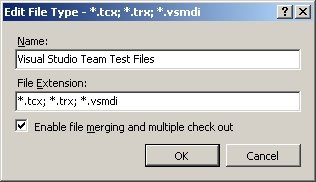
[UPDATE] I recommend that you reconfigure the .VSMDI file TFVC settings to not allow merging or multiple check-out. This is done in the 'Edit File Type' (see image above), which is available at 'Team-Team Foundation Server Settings-Source Control File Types' in VSTS.

VSTS will also check-out .VSMDI even when doing a get latest on the whole solution. I recommend my developers to immediately do a 'undo pending changes' on the file when this happens. The check-out seems to be quite unnecessary, why can't VSTS leave the file as-is until I touch the test system ? I know that VSTS monitors the disk for changes to relevant files, but I would prefer that the test metadata only got updated when building the solution.

Due to the VSTS test system's unreliable handling of the metadata file, we from time to time get "The test 'TestName' does not exist in the test list. It may have been moved, renamed or deleted". Yesterday, the 'Test Manager' showed all tests duplicated in the test lists. Today, another developer saw just some chinese characters when opening the metadata file. Sometimes we even get a second VSMDI file (e.g. Application2.vsmdi) in our solution, or no VSMDI file at all.

Some of my Objectware co-workers have given up TFS for unit testing due to this, and are using NUnit and CruiseControl.NET in their projects instead.

Thursday, February 02, 2006

VS2005 inherited user control, abstract factory/dependency injection pattern

Yesterday the need arised for inheriting a WinForms user control to implement four specializations of a user control. Creating inherited user controls is very simple in Visual Studio, just click 'Add-New item' and select 'Inherited user control', name the new user control appropiately and click 'Add'. I then selected the user control to derive from (note that the class must be plain public, while the constructor can be protected) and clicked OK.

VS2005 dutifully added the new user control files, but the VS designer failed with this error message:


One or more errors encountered while loading the designer. The errors are listed below. Some errors can be fixed by rebuilding your project, while others may require code changes.

Object reference not set to an instance of an object.

at System.Reflection.Assembly.nLoad(AssemblyName fileName, String codeBase, Evidence assemblySecurity, Assembly locationHint, StackCrawlMark& stackMark, Boolean throwOnFileNotFound, Boolean forIntrospection)
. . .
at Microsoft.VisualStudio.Design.Serialization.CodeDom. VSCodeDomDesignerLoader.DeferredLoadHandler.Microsoft.VisualStudio. TextManager.Interop.IVsTextBufferDataEvents.OnLoadCompleted(Int32 fReload)


Some googling did provided me with only a few similar problems, but none of the suggested solutions worked for me. Even adding two new user controls with no code or children would fail when trying to inherit one from the other.

The designer always calls the user control's parameterless constructor New and the control's Load event handler (provided that they exists), thus these methods should not do any operations that depend on some run-time resources.

I was quite puzzled when even added the two new plain user controls failed, as they of course had no constructor or load event handler. Then I noted that I could no longer open any user controls or forms in the whole solution. The VS designer had gone into a zombie state. A restart of Visual Studio, plus clearing the TFS workspace cache, corrected the VS designer problem for all the forms and the non-inherited user controls. Before I even tried to add a derived user control again, I did the recommended rebuild (see error message above) to ensure that coding errors did not cause the problem.

This time I added a standard user control and manually added the Inherits statement to the class code file and the designer partial class file. Then I opened the user control in designer mode, and I still got the famous designer error page, but this time with useful error details pointing me to a specific line in the base class.

The offending line was a private class member that created a biz-logic component using the abstract factory pattern:

Public Class GenericUCBase
. . .
Private _bizManager As IBizManager = ObjectFactory.BizManager()
. . .

Protected Sub New()

' This call is required by the Windows Form Designer.
InitializeComponent()
End Sub
. . .

The factory uses a Public Shared (static) method that creates objects using the dependency injection pattern (interface based) from pre-compiled assemblies deployed to the VS project location. It was the Type.GetType(typeName as String) method that failed when called from the private member initialization. I don't know why the VS designer failed to locate my assemblies during initialization, VS has no problems with non-derived controls, or with running or debugging the project.

All class members that are "declare initialized" gets called when the designer loads a user control, along with the constructor and the load event handler. Knowing this, I moved the initialization of the biz-logic component to my InitControl method, and this solved the VS designer problem.

The TFS workspace cache is located here:

\Documents and Settings\%user%\Local Settings\Application Data\Microsoft\Team Foundation\1.0\Cache

I clear it whenever I have problems with VS or TFVC, typically when the 'pending check-ins' list contains bogus entries from other solutions that cannot be removed in any other way.

Sunday, January 15, 2006

VB8: Friend setters, but no friend assemblies

The new version of Visual Basic (VB8, a.k.a VB.NET2) released with VS2005, has got several new language features, such as generics and friend property setters. The latter is a feature I was looking forwards to employ in my current project. The need for easily restricting which code is allowed to modify the content of business entity objects (i.e. setting property values) seemed to be a perfect match for friend setters (internal in C#).

The scenario is that we have the typical set of components, objects, and layers in our application: business entities (BE), business logic (BL), data access logic (DAL), and also a client application (PL) that consumes the services provided by the business layer. The PL code should not be able to modify some of the entity object properties, such as the .Id (primary key) of the entity. The main task of the DAL is to transform the entities to and from the database, thus DAL must be able to set all of the properties in a BE object. Just what friend setters are for:

Private _id As Integer
Public Property Id() As Integer
Get
Return _id
End Get
Friend Set(ByVal value As Integer)
_id = value
End Set
End Property


One object model design task remains, and the plan was to use another new VB8 feature promoted on several MSDN blogs through the Whidbey beta period: friend assemblies. First, me explain why friend assemblies are needed as part of the application's design.

As this is a distributed solution, we want to deploy a minimum set of components to the clients, both for operational and for security reasons. Thus, PL has only access to BE objects and a set of service proxies, but the BL and DAL objects are not deployed to the client. In fact, PL, BL, BE, and DAL are four different assemblies (VB projects). As the DAL and the BE components are separate assemblies, and some of the property setters cannot be public if the PL (and other future components and service consumers) should not be able to change those properties, the need for the InternalsVisibleTo mechanism arised.

To my disappointment, VB8 does not support friend assemblies (well, actually the VB8 compiler does not). I guess the "beta information - subject to change without notice" disclaimer has been applied to this feature.

Wednesday, December 21, 2005

VS2005 Design-time set DataSource error III

Design-time data-binding in .NET 2.0 WinForms is a real productivity booster that I use extensively. I have, however, had some problems with using the new object binding source mechanism (error I, error II) and today yet another problem. I began designing a new user-control a few days ago, and being a lazy developer, I copied some data bound comboboxes that I needed from another user-control.

I should have know better, copying controls was a recipy for immediate disaster in the VS2005 betas; you could be sure that the Visual Studio designer would fail when you later on re-opened the user-control. The same applied to renaming a control after modifying some of its properties. These problems have been fixed in the release version of VS, although opening a form still randomly causes the cursor to go into a blink frenzy for quite some time while re-syncing with the .Designer file.

Copying those combos kept some of the data binding properties (ValueMember, DisplayMember), but did not copy the binding sources (more on this below). I added the object binding sources in the 'Data Sources' explorer, and after some refreshing of the project data sources (error II), object binding seemed to work properly.

Today, I added another object binding source to the 'Data Sources' explorer of the user-control. If I then tried to use the DataSource property at design-time, I got this error:

Object reference not set to an instance of an object

Setting the data binding at run-time work fine. So does copying the original data source binding code from the hidden .Designer file, it even shows correctly in the control properties explorer, but cannot be changed due to the above error. But this is not how I want to do it, I wanted design-time binding to work. Any attempt to modify data binding on any controls in the form would cause the design-time error.

In an attempt to fix the binding problems, I used an old trick when working with software and computers; I restarted Visual Studio, opened the solution and cleaned it. Then I clicked the DataSource property of my failing combo. Now I got this error, which anyone who have parsed XML will recognize:

Root element is missing

After Visual Studio had shown this puzzling error (as usual no intelligble info provided in the message), all design-time data binding worked properly again and the combos were filled at run-time. Oh joy! . . . But the object binding source that I had added lastly, was gone from the 'Data Sources' explorer. As long as the design-time binding kind of worked again, I could live with that.

I suspected that there was a problem with one XML files in the solution and checked the various .RESX files and some other files with XML content, but I was not been able to find any error. When I had just about given up, I noticed that the three listed data sources in the 'Data Sources' explorer also happened to be the three first .datasource files in the \My Project\DataSources\ folder (use 'Show all files' in the 'Solution Explorer'). Thus, I opened the fourth .datasource file, and voila, it was empty! Visual Studio clearly just stops looping through the data sources when it encounters an error.

I excluded the empty file from the project, reloaded the solution, and then all the project data sources were listed in the 'Data Sources' explorer. Design-time binding now works as expected again. Oh, even more joy!

I am still sceptical to copying object bound controls from one WinForms user-control to another. The VS designer might punish you. Maybe I am just being paraniod.

Monday, December 19, 2005

VS2005 Crash on binding to data source II

Today I got a problem with VSTS 8.0.50727.42 that caused Visual Studio to just die, sometimes even without opening the error reporting dialog. This happened when trying to bind a DataGridView to a newly added object data source by using the popup toolbox of the grid. VS would vanish when I clicked the 'Choose data source' combo. No error message.

As I have had problems with the VS2005 data source mechanism before (data source crash I), I have some experience in troubleshooting data sources. I stared out checking for invalid, zombie data sources in the \My Project\DataSources\ folder (VB.NET), and removed an old, unused data source. This did not solve the problem, but I prefer to diagnose a clean solution.

When I made the new business entity object that I was adding as the new binding source, I also refactored some of the other entity objects to remove some obsolete properties and changed some property names to reflect gained knowledge about the domain.

I found out that VS2005 is not fond of such changes in the assemblies used as object binding sources. It is however, quite easy to make the data sources reflect the changes:
  • Select the project in the solution explorer
  • Click the 'Show all files' button
  • Navigate to 'My Project' and expand it
  • Navigate to the 'DataSource' child node and expand it
  • Select each of the data sources in turn
  • Right-click the data source and select 'Refresh'
Note that there is no refresh option on the 'DataSources' node in solution explorer, you have to manually refresh every single data source in your solution.

After refreshing the data source definition cache as described, VS2005 no longer performs harakiri in response to refactoring objects used as data sources.

Wednesday, December 07, 2005

TFS server restored - I miss SourceSafe's checkout options

The TFS server (beta 3 refresh) of our project had to be re-installed due to database problems, but I continued working offline (without TFVC) on the components that I am solely responsible for. I have done this many times before when SourceSafe has been unavailable due to no access to the "database" file share. Afterall, as a consultant I am often required to make changes to a previous project deliverable after moving on to the next customer. Sometimes I even have to fix bugs (a rare experience for me).

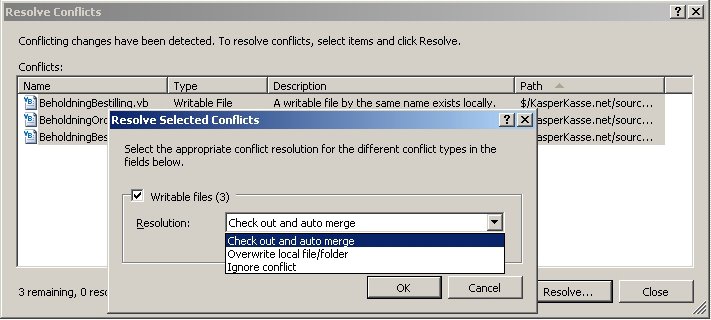
Today, the TF Version Control system was operational again. The TFVC responsible rebuilt the project from his last good known copy of the source files. Time for me to merge in my "offline" changes. I opened the 'Source Control Explorer', browsed to the project and selected 'Get latest version (recursive)'. TFS dutifully discovers and lists the source files that I have made changes to, and prompts me to resolve the conflicts (conflict type is 'Writable file').

TFVC provides you with three options for resolving writeable file conflicts:

  • Check out and auto merge: nice when it works, but it never did for me
  • Overwrite local files/folder: does exactly what it says, just remember to make copies of your "offline" work
  • Ignore conflicts: pointless option as TFVC will fail later on if you try to checkout a writeable file

Note that if you try to check out a writeable file, you will get this error: "Checkout error or user cancellation - File was not checked out".

Where did the useful SourceSafe checkout options for writeable files go ? As I am sure that sometimes in the future I will have to make offline changes to files, I miss these two options in TFVC:

  • Check out and replace: yes, I made some changes, but I want to discard them now, and then continue working on the file to implement the needed changes
  • Check out and leave: yes, let me keep my changes - AND - make it easy for me to add my changes to this file to TFVC

Please, can I at least have the 'check out and leave local file' option back ? Pleeease, TFVC team !

TFVC is really cumbersome when merging "offline" changes back into the version control system:

  1. Make a backup of your offline files using Windows Explorer before even thinking about using TFVC
  2. Perform 'Get latest version' to see which 'Writable files' conflicts there are, and remember the list of files
  3. Resolve all conflicts with 'overwrite local files/folder', unless the 'auto merge' option works for you; the 'ignore' option takes you nowhere
  4. Perform 'Check out for edit' on the files, note that this will only work if you first have "resolved" the conflict by overwriting your offline changes
  5. Replace the old versions of the changed files with the "offline" files using Windows Explorer
  6. Finally check in the 'pending changes' set of source files

You will soon find out that the above should be done with a small set of files at a time, as it is easy to loose track of which source items have been merged or not.

I wonder what kind of usability tests they do at Microsoft to think that TFVC will always be available/online, or to decide that options that were available in SourceSafe for a good reason is no longer needed in the brave new team foundation world. Maybe it is true that the TB manager is so oblivious to the community that he had never heard of CruiseControl.NET.

Tuesday, December 06, 2005

TFS server down - continue working in VSTS

Yesterday our TFS server (beta 3 refresh) started behaving strangely; if I checked in a file and then immediately viewed the file through 'Source Control Explorer' history, it would open the correct file (correct file name in the titlebar), but it contained MSBuild XML content insteadof the original code. This did ofcourse cause all server-side builds to fail. The project's TFS gurus are working on restoring the different TFS databases in the correct order, but this has turned out to be non-trivial. TFS seems to work fine for a while, then the problems are back.

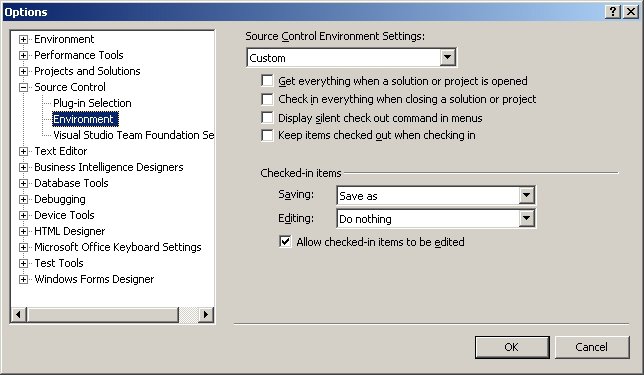
Thus, we are not able to use TFS as of now, but I need to continue working locally on my PC. The default source control settings in VS2005 is not very useful when a connection to TFS cannot be made; it will try to check out files and then just fail, not giving any fallback options. I had to make these changes to 'Checked-in items' in the VS2005 options to be able to 1) edit files and 2) save them locally:


Note that you must clear the 'read only' attribute of a file to be able to save it. Just select the file to overwrite in the 'Save as' dialog, then use 'alt-Enter' to change the properties of the file.

The old SourceSafe 'overwrite' option popup is not available when editing and saving a file that is under source control. You need to change the TFVC options before you can edit and save the file.

The reason for trying to restore the databases is that one of the developers could not delete a test project from TFS using the TFSDeleteProject tool, and then manually deleted some records in the database. The gurus have just given up the restore activities, and are now reinstalling TFS from scratch...

The morale: don't mess with stuff that works.

Monday, November 14, 2005

VSTS/TFS - xcopy to latest build; assembly references

The Team Build system of the Team Foundation Server builds a solution to a drop folder $(DropLocation) with a new sub-folder for each successful build $(BuildNumber). Using a dynamic folder as the source of a project's referenced assemblies in Visual Stuido is not supported, thus a post build action is needed to copy the built assemblies to a fixed location.

The task of copying the generated assemblies to a fixed 'latest build' folder is called 'Publish' in TFS. How to configure this custom action to xcopy *.* is, however, not bleeding obvious when setting up your build; in addition, the documentation seems to be incorrect. We have used this custom action configuration (see last reply) to publish to our \latestbuild\ folder. The "workaround" is to use <CreateItem> instead of an <ItemGroup>.

I really think that the Team Build wizard should include an option to specify a latest build location in the Location step.

These MSDN blog posts 'Part I' and 'Part II' explain how assembly references are resolved in Team Build. Note how the recommendations are different for intra-solution and cross-solution references:
  • Intra solution: use project references, not file references to your assemblies
  • Cross solution: use file references to your assemblies, and add an AfterBuild custom post build step in each of the assembly projects to copy the generated assemblies to the common 'binaries' location
Note that the 'post build step' custom action must be added to the assembly project, not the team build project. Ensure that you scroll down to see all the text of Manish Agarwal's part II posting on assembly references.

'Part III' is about references to a set of common assemblies, and this is where the 'xcopy' team build custom action comes in handy, e.g. to the shared location \Objectware.ShipBroker.Application\latestbuild\

Friday, November 11, 2005

VS2005 Add new data source wizard crash

Today I had a strange problem with VSTS 8.0.50727.42: I could not add a new data source of type 'object' to my Windows control library project. Adding a database or web-service data source worked fine.

The wizard would crash when trying to open the 'Select the object you wish to bind to' page of the wizard. The error message was this:

An unexpected error has occured.
Error message: Object reference not set to an instance of an object.


If I made a new Windows control library project and added classes from my business entity assembly as object data sources, the wizard worked as expected (kind of stupid that several classes cannot be added in one go, though). After several hours of experimenting with project references, structure, and even names, I finally saw the pattern of when the wizard worked and when it crashed. The wizard is dependent on your project having at least one public class in the root folder of your project.

In my Windows control library project I have structured the source code into several folders with no classes in the root. VS by default generates a class called 'UserControl1' in the root, and if you delete this class, the wizard will fail.

I now use a dummy class 'XDummyClassForDataBinding' in my project.

Thursday, November 10, 2005

VSTS - test project location and output

As a seasoned developer, I have a legacy of project folder structure preferences. Among other things, I like to keep non-source code stuff such as solutions and setup projects separate from the actual source code.The structure typically looks like this:

\source
\sln
\app1
\src
\app1
\test
\app1.test
\setup
\latestbuild
\references


\test
\app1.test
\testresults

Adding a unit test using VSTS (right click method name - "Create unit test"), however, creates the test project folder as a subfolder at the location of your .SLN file. It is easy to move the generated test project. Just remove it from the solution, move the project files and folders with Explorer, then add the test project to the solution from the new location (Add-Existing project). You should also move the localtestrun.testrunconfig file to the applicable test project folder. Note that the Test Manager file (.VSMDI) of a solution cannot be moved.

The bottom \test\ folder in the above list is the target for all output and reports created when running unit tests. I use a folder outside the \source\ folder to keep this stuff separate from the source code of the unit tests and the application itself.

VSTS produces a 'run details' file each time you run a unit test, and the test results are stored as .TRX files in a TestResults folder (yes) at the location of your .SLN file. The location of the test output was configurable in 'Edit test run configurations - Local test run - Deployment' in the VSTS betas, but this setting is now visually gone. Fear not, the setting is still in the .testrunconfig file, which is plain XML.

Open your .testrunconfig file and edit these elements:

<userDeploymentRoot type="System.String">..\..\test\app1.test\testresults\ </userDeploymentRoot>
<useDefaultDeploymentRoot type="System.Boolean">False</useDefaultDeploymentRoot>


Note that the last setting must be false, not true as someone has posted on forums.microsoft.com.

With these modifications to the default VSTS unit testing structure, my solution is now the way I like it. Maybe I am fighting the Visual Studio system too much, afterall Microsoft may have done usability studies to decide that their structure is the best...

Wednesday, October 19, 2005

Rebuild VSTO-O add-in on .NET2.0 RC1

Last week our VSTO-O add-in would not load when installed on new client PCs. This was caused by the automatic download and installment of .NET2.0 RC1 performed by the VSTO setup project, while the add-in was built with .NET2.0 beta 2. A rebuild of the add-in and the setup project was needed to make things work. Thus, I had to uninstall all beta 2 stuff, including .NET, Visual Studio 2005, VSTO runtime, SQL Express, etc. After that, I installed VS2005 RC1 on my PC, which now includes the VSTO project templates by default.

The existing VSTO-O project compiled without problems in VS2005 RC1, so I didn't need to create a new project and move the code manually as I had to when going from VSTO alpha to VSTO beta. You might not be that lucky (see the article referenced below).

Some modifications was needed for the setup project. In beta 2, you had to manually add several VSTO assemblies (DLLs) and install them to your target folder. I removed all those VSTO assemblies, and did a 'refresh dependencies', which in RC1 is able to correctly detect and add the required VSTO assemblies to the setup kit.

The add-in would, however, still not load in Outlook. As I know the details on how to get a VSTO-O add-in to load, I quickly turned to the registry to check the CLSID InprocServer32 setting for my add-in. In VSTO-O beta 2, the add-in loader was named VSTAddin.DLL, while it in RC1 has got the documented, correct name AddinLoader.DLL. Use 'View-Registry' in the VS2005 setup project, navigate to HKCU\Software\Classes\CLSID\{guid}\InprocServer32\ key and change the name of the VSTO loader stored in the (default) setting.

With these changes to my setup project, the add-in now installs, loads and works correctly on RC1.

Note that modifying the setup project is not needed if you choose to start with a new VSTO-O project and move the code manually from the old beta 2 project.

Mads Nissen has posted
an article that describes how to get your VSTO-O add-in to work with .NET2.0 RC1 and details about making a fully automated setup kit using a custom prerequisite with the setup project. He has also updated the CAS custom installer action to support uninstall.

Thursday, October 13, 2005

.NET2.0 ObjectDataSource and BindingList<T> VS typed datasets

I am currently at a project where some VB6 and .NET1.1 WinForms applications are to be ported and upgraded to .NET2.0. The current architecture is layered and employs (custom) business entity objects modelled on the domain of the customer. The solution is distributed over several tiers, and the communications technology of the architecure (.NET remoting) is also up for review. In addition, it is a design goal to enable the solution to provide services and entity data to external systems, both within the company and to e.g. partners.

Yesterday some of the developers started to argue for replacing the existing business entity objects with typed datasets. Their main reason for this was to get "maximum" developer productivity through two-way WinForms data binding in the user controls. This is a typical way of thinking for developers that have worked mainly with databases and ASP.NET solutions. In addition, scrapping the domain entity objects would be a step in the wrong direction from 'domain driven design' (DDD) and from 'service orientation' enabling the solution. This discussion is not a new one, refer to this MSDN article by Dino Esposito for pros & cons of datasets vs business entity objects. I also recommend reading the articles referenced at the end of the 'Cutting Edge' article. Note how they all agree on that exposing datasets in a service is a bad idea.

.NET2.0 provides several new mechanisms aimed at bringing the ease of dataset binding to business entity objects, allowing the developers to use design time tools and wizards to bind their GUI to entity objects. The ObjectDataSource (BindingSource) and the generic BindingList<T> are the main enabling object binding mechanisms in .NET2.0. Note that it is possible to provide object binding also in .NET1.1 as shown in this MDSN article by Paul Ballard, but it will require more coding and will not give full design time support for setting up the binding.

What you will find out is that the BindingList<T> has some 'last mile' problems when compared to the binding mechanisms provided by the DataView/DataSet combination. In our prototype/spike the lack of built-in implementation for sorting and filtering immediately surfaced. These methods are defined in the IBindingList interface, but is not implemented by BindingList<T>. A bit of googling led me to this blog entry and this GotDotNet workspace. Andrew Davey's BindingListView<T> provides a data bindable view for a BindingList, in the same way that a DataView provides a bindable view of a DataTable. This component implements much of the stuff described in Paul Ballard's article. One less argument for the typed dataset clan :-)

Typed datasets still has the upper hand when it comes to batch updates, optimistic concurrency, etc, when compared to custom business entity objects and collections. What the solution might need is an ORM framework that handles all the object-to-database stuff (the DDD repository pattern). I might be in for a classic turf war with the dataset-all-the-way clansmen!

Tuesday, October 11, 2005

VS2005 and VSTO-O reinstall blues

Due to some problems with my Visual Studio 2005 installation, I had to reinstall VSTS on my PC. This caused my VSTO Outlook projects to stop working in VSTS with the error message "Unable to load project file <file name>". No further details were given. I then reinstalled VSTO-O beta 2, the VSTO beta 2 run-time (VSTOR.EXE), and the Office 2003 PIAs. Still no luck. I then reinstalled the Windows Script 5.6 as this had solved a VS.NET problem for me before. My project would still not load.

I then tried to create a new VSTO-O project, and this time I got the famous "class not registered" error. As usual, no details about which class.

It was time for RegMon from System Internals, a company that provides high quality freeware tools for "under the hood" monitoring during deployment and troubleshooting. I opened VSTS, selected 'File-New-Project' and browsed to the "Outlook Add-in" project template. Then I captured all registry access done while I clicked OK in the VSTS 'New Project' dialog. RegMon captured a looong list of trace, but by filtering on process name "devenv*" the list was shortened to only a few hundred entries.

Starting from the bottom of the list, I soon found two "OpenKey" events that resulted in "NOT FOUND", with no further attempts to read info about the CLSID. Double-clicking the entry in RegMon opened the standard Registry Editor, in which I myself could see that the specified CLSID was nowhere to be found in the registry.

I then used another PC with a working copy of VSTS and used the standard Registry Editor to search for the CLSID (GUID), and it turned out to be MSXML6.DLL that was missing on my PC. You will find this DLL in the System32 folder.

I think that all this was caused by uninstalling SQL Express from my PC. It would not be the first time Microsoft installers do not mark shared DLLs as "permanent".

Wednesday, March 30, 2005

VS.NET wizards and "Library not registered"

I have had an annoying problem with VS.NET 2003 for several months now, after uninstalling some trial add-ins for Office. The problem is that all of the C# 'add new' wizards in VS.NET would fail with "library not registered", e.g. I could not add a new project, a new class, etc. So I have had to copy and modify existing files to be able to add new stuff to my solutions.

After a lot of googling, I tried all of the solutions suggested on the 'net:

  • registering the C++ COM component \Vc7\vcpackages\csproj.dll
  • registering all the COM components in \Microsoft Visual Studio .NET 2003\ including all sub directories
  • repairing VS.NET
  • uninstalling VS.NET, reboot, installing VS.NET, reboot
...but none of these actions helped me. The first action is what fixes this problem in most cases.

When the problem was not fixed even after a complete reinstall of VS.NET, I finally tried installing Windows Script 5.6, even if I thought that it seemed like a far shot. And know what; it actually fixed the problem! After several hours of grief, I am now able to create a new Infopath project in VS.NET.

Monday, March 14, 2005

Character encoding in SPS2003 and regional settings

Most of our SharePoint installations, both SPS and WSS, uses the Norwegian version or at least require that areas, surveys, listings and fields added to SPS can handle Norwegian characters (ÆØÅ). The character encoding is configured in WEB.CONFIG using the globalization element, and this defaults to fileEncoding="utf-8". What ever you do, do not change this into e.g. fileEncoding="iso-8859-1" to get support for the encoding you use in your web parts.

The problem you can get into is that SPS requires unicode text (utf-8 encoding) and when a listing field or a web part contains non-unicode text (e.g. iso-8859-1 encoded), this will cause the unicode parsing to fail because the Norwegian characters signals an escape sequence to the parser, which it really is not. The parser detects an invalid utf-8 escape sequence and outputs a ? instead of the expected and following characters. This is very annoying in listing field names as it causes the list rendering to fail and then the list cannot be modified to fix this problem.

We have experienced problems with the encoding when deploying web parts that are really ASP.NET user controls. To make this kind of web parts render correctly, and allow the standard SPS stuff to work correctly with ÆØÅ, you must ensure that the globalization element has this configuration:

fileEncoding="utf-8" requestEncoding="utf-8" responseEncoding="utf-8"

Then you must ensure that your ASP.NET user control's .ASCX file uses unicode as the encoding by using "File - Advanced Save Options" in VS.NET. Select "Unicode (UTF-8 with signature) - Codepage 65001" as the encoding, then save the file. Switch to HTML view if the menu item is not visible in design mode. The same procedure must be applied to all .ASCX and .ASPX files that you use as part of a SPS solution. Read more about Unicode in ASP.NET in this blog.

In addition, you must always set the correct regional settings for your SPS portal site (once for all areas) and for all your WSS team sites (on every single site).

Note that the WEB.CONFIG file is replaced when restoring a SharePoint portal site, and this will cause all your changes to the configuration to be lost. Always make a backup copy of WEB.CONFIG before restoring portal sites.