Showing posts with label TDD. Show all posts

Tuesday, April 08, 2008

CAB/SCSF: Unit Testing Presenters, Views, Events

Unit-testing a CAB/SCSF module and all its presenters and views, in addition to testing the publish/subscribe event handling, can be quite challenging to get started with. The TestableRootWorkItem class is required to get started with unit-testing and mocking, as this does all the dependency injection that CAB depends on. Just add all the components to the WorkItem to trigger the DI mechanism.

Use the TestableRootWorkItem like this:

private MockRepository _mocks;
private TestableRootWorkItem _workitem;
private MyViewPresenter _presenter;
private IMyView _view;
private IMyService _service;

[TestFixtureSetUp]
public void Initialize()
{
_mocks = new MockRepository();
_service = _mocks.CreateMock<IMyService>();
_view = _mocks.CreateMock<IMyView>();

_workitem = new TestableRootWorkItem();
_workitem.Services.Add(_service);

//perform the CAB DI-container magic
_presenter = _workitem.Items.AddNew<MyViewPresenter>();
_presenter.View = _view;
}


Note: do not try to access the workitem or any injected dependencies such as [ServiceDependency] inside constructors, things might not have been resolved by the DI container yet. This especially applies to stuff from base classes and things that are not resolved using an [InjectionConstructor].

When testing that event publishing actually triggers the subscribers, you can add fake event publishers and subscribers to help with the mocking. In addition, your unit-test should verify that the raised event causes presenters and views to be loaded by checking the content of the Items and SmartPart collections afterwards.

Implement your CAB/SCSF event-based unit-test like this:

[TestFixture]
public class ModuleTestFixture
{
. . .

[TestFixtureSetUp]
public void Initialize()
{
_workitem = new TestableRootWorkItem();
_eventPublisher = _workitem.Items.AddNew<MockEventPublisher>(_eventPublisherId);
_eventSubscriber = _workitem.Items.AddNew<MockEventSubscriber>(_eventSubscriberId);
_moduleInitializer = new Module(_workitem);
_moduleInitializer.Load();
}

[Test]
public void ShouldLaunchPriceConfigViewOnEvent()
{
int itemPresentersCount = FindItemsByTypeRecursive <PriceConfigurationViewPresenter>(_workitem);
Assert.AreEqual(0, itemPresentersCount);

int smartPartViewsCount = FindSmarPartsByTypeRecursive <PriceConfigurationView>(_workitem);
Assert.AreEqual(0, smartPartViewsCount);

_eventPublisher.OnNewOrder(new NewOrderEventArgs(123, Constants.OperationNames.StartPriceConfigurationView));


Assert.AreEqual(true, _eventPublisher.HasRaisedNewOrder, "EventPublication <NewOrder> failed");
Assert.AreEqual(true, _eventSubscriber.HasHandledNewOrder, "EventSubscription <NewOrder> failed");

itemPresentersCount = FindItemsByTypeRecursive <PriceConfigurationViewPresenter>(_workitem);
Assert.AreEqual(1, itemPresentersCount);

smartPartViewsCount = FindSmarPartsByTypeRecursive <PriceConfigurationView>(_workitem);
Assert.AreEqual(1, smartPartViewsCount);
}


private int FindItemsByTypeRecursive<T>(WorkItem workItem)
{
ICollection<T> items = workItem.Items.FindByType<T>();
int typeCount = items.Count;
foreach (System.Collections.Generic.KeyValuePair<string, WorkItem> item in workItem.WorkItems)
{
typeCount += FindItemsByTypeRecursive<T>(item.Value);
}
return typeCount;
}


private int FindSmarPartsByTypeRecursive<T>(WorkItem workItem)
{
ICollection<T> items = workItem.SmartParts.FindByType<T>();
int typeCount = items.Count;
foreach (System.Collections.Generic.KeyValuePair<string, WorkItem> item in workItem.WorkItems)
{
typeCount += FindSmarPartsByTypeRecursive<T>(item.Value);
}
return typeCount;
}

}


public class MockEventPublisher
{
[EventPublication(Constants.EventTopicNames.NewOrder, PublicationScope.Global)]
public event System.EventHandler<NewOrderEventArgs> NewOrder;

public virtual void OnNewOrder(NewOrderEventArgs eventArgs)
{
if (NewOrder != null)
{
_hasRaisedNewOrder = true;
NewOrder(this, eventArgs);
}
}

public bool HasRaisedNewOrder
{
get { return _hasRaisedNewOrder; }
set { _hasRaisedNewOrder = value; }
}
private bool _hasRaisedNewOrder = false;
}


public class MockEventSubscriber
{
[EventSubscription(Constants.EventTopicNames.NewOrder)]
public void OnNewOrder(object sender, NewOrderEventArgs eventArgs)
{
if (eventArgs.OperationName == Constants.OperationNames.StartPriceConfigurationView)
{
_hasHandledNewOrder = true;
}
}

public bool HasHandledNewOrder
{
get { return _hasHandledNewOrder; }
set { _hasHandledNewOrder = value; }
}
private bool _hasHandledNewOrder = false;
}

If you have issues with understanding that a WorkItem is just a dependency injection container or what all the different collections such as Items, Services, SmartParts, WorkSpaces, etc are for; I recommend reading Rich Newman's Introduction to CAB/SCSF. Read part 18 first.

Friday, January 12, 2007

Test smell == Design smell

One of the goals of Test Driven Development is to make sure that your services/object model meets the loose coupling/high cohesion goal of software design. If it is hard to write a unit test for one of your methods, the method has low "testability". Refer to the 'Testability' section of this article at Jeremy Millers' blog for more info about the relationship between testability and design.

Testability and reusability are two closely related aspects of a service/object model. If an operation is not easy to test, it is not easy to reuse. And if it is not easy to reuse, the operation is not well suited for use as part of a composable system. Thus a service with low testability will most likely be hard to reuse in a service-oriented architecture.

Services and operations need to be highly reusable, as a major benefit of truly service-oriented systems is agility: your boss have heard that you have e.g. a currency conversion service based on live exchange rates, and he needs just this functionality right now on the company web-site. If your operation has too many dependencies and cannot easily be reused stand-alone, i.e. the operation requires a complicated/smelly unit-test; the operation is just not ready for real-life SOA.

Low testability is easy to spot: the test method contains a lot of context setup code, session stuff, for-loops and if-else/switch, excessive reference data lookup, calling several other classes or operations, etc. I think of these test anti-patterns as 'test smells', after the term 'code smell' coined by Kent Beck. A test smell is usually an indication of bad design in the tested classes, thus the term 'design smell' comes into mind. A design smell is any anti-pattern to the existing software design best practices and patterns.

Note that test smells and design smells need not be code smells. E.g. for-loops in a test is smelly, for-loops in code is normal; methods with several parameters are OK in code, but is a design smell in service-oriented operations. And the other way; e.g. most code smells regarding the relationship between classes (feature envy, intimacy, tell-don't ask, etc) are also test smells.


These days I am writing some unit-tests to get to know some legacy services. The service was written by someone else, and this is a good way to review the design and reusability of the services. This unit-test code is an example of "the easiest way" to add a comment to an activity using the legacy services, including my "smelly" notes:

//TEST SMELL: CANNOT CONTROL TRANSACTION FROM TEST
//MAJOR DESIGN SMELL: DECLARATIVE TRANSACTIONS NOT SUPPORTED

using (TransactionScope transx = new TransactionScope (TransactionScopeOption.Suppress))
{
//TEST SMELL: FOR-LOOP FOR LOOKING UP REFERENCE DATA
string activityTypeId = null;
foreach (TableValue activityType in referenceData.activityTypeList)
{
//DESIGN SMELL: WHY ISN'T "TYPE" EXPOSED IN THE ACTIVITY OBJECT
if (String.Compare(activityType.name, activity.name)==0)
{activityTypeId = activityType.Id;break;}
}

Assert.IsTrue(activityTypeId != null, "activityTypeId not found in referenceData.activityTypeList collection.");

//DESIGN SMELL: WHY ISN'T "ACTIVITYID" EXPOSED IN THE ACTIVITY OBJECT
string activityId = Constants.NodeId;
string responsibleId = activity.responsible;

//MAJOR DESIGN SMELL: EVERYTHING IS A STRING
//CODE SMELL: PRIMITIVE OBSESSION
string text = "unit-test text";
. . .

string regDate = System.DateTime.Now.ToString(Constants.FORMAT_DATE);
string archive = "false";
string enumerate = "false";

//DESIGN SMELL: RETURNING ENTITIES FROM ADD OPERATION IMPOSES TWO-WAY OPERATION
//DESIGN SMELL: NOT A MESSAGE-BASED SERVICE OPERATION
Comment[] inserted = target.addComment(Constants.VesselGuid, path, activityTypeGuid, status, severity,id, text, responsibleGuid, regDate, commentTypeGuid, archive, enumerate);

Assert.IsTrue(inserted.Length>0, "addComment did not return the expected value.");

//transx.Complete(); //no commit == rollback
. . .

}

The example also shows one of the subtle test smells: the test cannot apply a transaction to the business operation as this will cause the test to fail. As this due to the implementation of the object model, this is a major design smell. This kind of logical design error can go undetected for a long time and cause hard to diagnose errors, as the code will not cause run-time errors until someone tries to create a new transacted operation by composing existing "explicit transaction" operations.

Unit-tests serve many purposes, and if for no other reason, you should write unit-tests to assess the testability of your code, and thus design quality, reusability and agility of the services.

PS! I have updated all my postings with the new tag/label mechanism of Blogger, so my RSS feed will be a little crazy due to the updates.

Tuesday, January 09, 2007

NUnit: deployment items with ReSharper/TestDriven.NET

I like my solutions to be self-contained, that is - by just checking out all files from the solution root in the source control management (SCM) system, the solution should be able to compile and run. This includes storing the referenced assemblies and their dependencies in the SCM: "everything you need to do a build should in there including: test scripts, properties files, database schema, install scripts, and third party libraries" [Fowler: Continuous Integration].

And as the unit tests should be treated as first class citizens in a solution, the SCM best practices must apply to the test project also. Adding the referenced assemblies to a NUnit test project is straightforward, but how do you add the dependencies of the references (i.e. the assemblies referenced by the referenced assemblies, and so on) ? For those using a native NUnit project this can be configured using the "Assemblies" tab in the "Project Editor".

For those using ReSharper and/or TestDriven.NET, just adding both the referenced assemblies and all their dependencies to the Visual Studio class library "NUnit" project will work. The downside of this is that you will get more object models/namespaces to choose from when coding your tests, and even if ReSharper somewhat helps you pick and create "using" statements, it can be confusing and thus a source of errors.

VSTS has a nice solution to this "extra binaries" problem, the deployment item mechanism, which I have used in other projects. So this is how I implemented support for using a \DeploymentItems\ folder in my NUnit test project (note that my build output folder is just \bin\ without debug or release):

[TestFixtureSetUp]
public void TestFixtureSetup()
{
foreach (string file in Directory.GetFiles(@"..\DeploymentItems\", "*.dll"))
{
string newFile = Path.Combine(@"..\bin\", Path.GetFileName(file));
if (File.Exists(newFile)) File.Delete(newFile);
File.Copy(file, newFile);
File.SetAttributes(newFile, FileAttributes.Normal);
}
}

Note that the file attribute is set to normal after copying it, this is to remove any read-only attribute on the assembly to ensure that it can be overwritten the next time the tests are run. Afterall, the deployment items must also be source controlled and will thus be read-only when you do a "get latest version" from your SCM.

The DeploymentItems folder is not limited to assemblies, just change the GetFiles filter to copy other items to the test execution location as well.


The solution is inspired by Scott Hanselman's post about unit testing with Cassini.

Wednesday, April 05, 2006

VSMDI file - The weak spot of the VSTS test system

The Visual Studio Test Metadata File (.VSMDI) has caused some grief in our ongoing project, in which we use Team Foundation Version Control (TFVC) also. We have a solution with six projects for the application layer, including one common test project.

What typically happens is that VS2005 automatically checks-out the metadata file even when a developer do not work on a unit test, or touch the test project or the test manager. As the check-out is silent, the developer does not notice this. After doing some coding, the developer will try to check in the pending changes. In the meantime, other developers will also have done some unit tests, coding and check-ins, causing a conflict on the .VSMDI file. At this point, VSMDI is a disaster waiting to happen...


Never ever use 'auto merge' to resolve check-in conflicts on the .VSMDI file. The chances are that the file will get corrupted. If you have a conflict, I recommend discarding your local changes, get the latest version of the .VSMDI file from TFVC (use 'force get...' and 'overwrite...' if necessary), then re-apply your changes to the tests and test lists, and check the file in immediately. Do not keep the .VSMDI file checked out longer than strictly necessary.

A sure sign of a corrupted VSMDI file is a Test Manager that never stops loading, the progress bar teasing you at "almost there" forever.

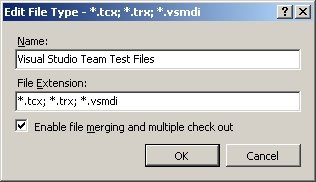
[UPDATE] I recommend that you reconfigure the .VSMDI file TFVC settings to not allow merging or multiple check-out. This is done in the 'Edit File Type' (see image above), which is available at 'Team-Team Foundation Server Settings-Source Control File Types' in VSTS.

VSTS will also check-out .VSMDI even when doing a get latest on the whole solution. I recommend my developers to immediately do a 'undo pending changes' on the file when this happens. The check-out seems to be quite unnecessary, why can't VSTS leave the file as-is until I touch the test system ? I know that VSTS monitors the disk for changes to relevant files, but I would prefer that the test metadata only got updated when building the solution.

Due to the VSTS test system's unreliable handling of the metadata file, we from time to time get "The test 'TestName' does not exist in the test list. It may have been moved, renamed or deleted". Yesterday, the 'Test Manager' showed all tests duplicated in the test lists. Today, another developer saw just some chinese characters when opening the metadata file. Sometimes we even get a second VSMDI file (e.g. Application2.vsmdi) in our solution, or no VSMDI file at all.

Some of my Objectware co-workers have given up TFS for unit testing due to this, and are using NUnit and CruiseControl.NET in their projects instead.

Sunday, February 05, 2006

Implementing "RowState" for Entity Objects

At my current project, we have some object model design discussions about "the how" for our entity objects (whose primary objective is "the what" of the domain), between the DataSet clan and the POCO clan. Our system is quite big, and must be designed to make it easy to provide future services to other parts of the organization (including Java-based systems) and to external partners. Support for web-services is a planned feature of the system, not to mention SOA.

Personally, I always like to design a system in a way that make the client application just another consumer of the system services. This promotes re-usability and low coupling, and is best achieved through a TDD approach. Thus, as you may guess, I am not in favor of using DataSets as the basis for entity objects, value objects, messages, or for DTOs. I recommend reading Scott Hanselman's famous blog post about using DataSets as business objects or as message elements in web-services. Also check out this MSDN Mag article, including the referenced blog posts at the end of the article.

Design-time data-binding of anything but DataSets was not simple in .NET 1.1, but with the advent of the object binding source and generics (List<T>) in .NET 2.0, it has become viable to do data-binding to entity objects and lists/collections.

The software design discussion now revolve around the RowState to signal the state of an entity object in relation to a containing list. Having a RowState property is really useful when e.g. implementing the 'Unit of Work' pattern. I have promoted that the 'cloning' and 'is dirty' mechanisms, plus a deleted flag as enough, while the DataSet clan advocates the need for a separate, setable row-state property, which will introduce some ambiguity in deducing the actual state of an entity object when received from a client.

I claim that the RowState need not be a separate, serializable property, it is just a read-only combination of the entity object identifier .Id, .IsDirty, and an .IsDeleted flag (the latter being the only setable property, the other two are read-only to the clients). Each entity object must have a class member that contains a clone of its original state. The .Id (internal, hidden entity identifier; PK) is assumed to be e.g. -1 when the object is not an existing entity in the data store. The state of an entity object is deduced like this:

  • Added: .Id == -1 && .IsDirty == true && .IsDeleted == false
  • Deleted: .IsDeleted == true && .Id != -1 (must exist to be deleted)
  • Detached: not applicable, entites are not defined by membership in any List<T>
  • Modified: .Id != -1 && .IsDirty == true && .IsDeleted == false
  • Unchanged I: .IsDirty == false && .IsDeleted == false
  • Unchanged II: .Id == -1 && .IsDeleted == true (aborted insert, no operation on this operand)
Thus, RowState is just a read-only property on the entity object. If your system requires the need for public setable row-state (like the new feature in ADO.NET 2.0), I recommend that you add an AdviceRowState property that the system clients can use to signal their intended state of the entity object.

Remember to keep any "how" properties away from the serialization of the "what" when using serialization as the basis for .IsDirty, otherwise such extra properties will cause bogus 'is dirty' logic. This includes any 'original values' clone that you may include in the entity object to support the .IsDirty method. As the 'is dirty' code uses the BinaryFormatter, use the [NonSerialized] attribute on all fields/class members that should not be comprised by the .IsDirty comparison.

You may also need to exclude some properties from XML serialization e.g. to prevent exposure in your web-services.
Apply the XML serialization control attribute XmlIgnore to such properties. You may also conditionally serialize properties such as the AdviceRowState property to XML. Add an extra control property bool AdviceRowStateSpecified and set it to false to exclude the actual property from XML serialization. Apply [XmlIgnore] to the AdviceRowStateSpecified property as you do not want it to be serialized anyway.

It should always be an internal aspect of your system how domain entities are stored, how you implement locking, how you implement long-running work/operations, etc ( see Data on the outside vs. Data on the inside by Pat Helland). The AdviceRowState property is just for giving the client the perception of having a say. The operations provided by your system should always make the client say please: "please update the account with this data", "please delete this order", etc.

The WinForms DataGridView still favors the use of DataSets as it has built-in support for DataTable.DataRow.RowState, e.g. automatically hiding deleted rows. This will not happen when using an object binding source bound to a generic list. Using two List<T> are one way of solving this, one for the deleted entities and one for the others. Use the latter as an object binding source, and the former to keep track of deleted entities. Pass both lists in the message to your service to save the changes (the lists are the 'operands' of the message).

Thus, the RAD model of Visual Studio favors developer productivity over good software design. Read 'Does Visual Studio Rot the Mind?' by Charles Petzold for more on this topic.

Friday, January 20, 2006

Unit testing is not result testing (only)

Unit testing has been around for quite some time now for .NET, thanks to tools such as NUnit and TestDriven.NET. The idea of unit testing, however, still has not convinced the majority of developers to change their ways. With the release of VS2005 Team Suite (VSTS), unit testing are now on the agenda of most IT managers, and thus even the most ignorant programmers may soon have to deal with unit testing.

I have participated at several VSTS unit testing introductions at different customers the last year, and the initial response is the same everywhere: “this is nice in theory and in a small demo, but it will be too much extra work to implement unit tests that covers our code”. Add in the “how do we test databases with inserts, updates, delete?” challenge, and you know that the attendees are only human, skeptical to change and skeptical to ideas from the management.

The reason for this typical response, I believe, is due to the typical way unit testing is demoed: the math library. Write a test to add two numbers and make it pass. The assert phase of the test is always Assert.AreEqual, checking to see that the result is the sum of the two numbers. I bet almost every introduction to unit testing that you have read or seen, are in fact result testing.

People are being brainwashed into believing that unit testing is testing for exact results and nothing but testing results. Result testing is of course a very common type of unit testing, but you will soon find out that writing tests for anything but a math library is not trivial when testing for exactness of returned values/data/content is your perception of unit testing.

My point is that writing unit tests are much simpler when asserting that the returned data falls within an expected range, is not null, did not fail or failed as expected, etc. Think of unit testing more like doing calculations in your head when shopping, where a rough amount is adequate, rather than trying to get the correct answer with two decimals.

Another point on the ‘exact result testing’ mindset: when introducing unit testing, someone will always point out that is will require a lot of work to write tests that asserts every possible outcome of a real-life method. This is correct. But again, what is sufficient to start with? The best is the enemy of the good. Start with a few tests that assert the typical outcome of the method. Always add a new test when a bug is encountered, failing at first, fix the bug and make the test pass. Always add a new test when adding to a class or changing the way it works. Given enough time, this strategy will ensure that you get good enough unit testing coverage of your code.

One last typical dialog to illustrate the above point:
Developer: “The logic behind creating a new customer/account is quite complicated, and the combination of possible input to the business logic will be impossible to test, so why bother with writing extra code for unit testing?”
Me: “Ok. How do you test the biz-logic today? You do test it, do you not?”
Developer: “Of course! I have a test form with plenty of input fields, a couple of buttons, and a datagrid to show the results.”
Me: “How do you ensure that your testing covers all aspects of your biz-logic?”
Developer: “I enter some typical values, push the buttons and checks that the grid gets filled…”
Me: “So, you just check that the returned result seems to be as expected, or do you closely examine each and every value in the grid?”
Developer: “No… That is not necessary… As long as the result is not weird, I assume that the biz-logic is correct…”
Me: “Then, why do you insist on the unit tests to be ‘exact result’ tests, and that they should cover all combinations of input? Are you persistent enough to always do all your ‘push button’ tests each time you change your code? Wouldn’t an automated test regime that is at least as cautious about ‘output falls within range’ as your manual testing, be an improvement?”

At this point in the discussion, most developers admits that they are bored stiff by the test forms, and that writing unit tests instead of test forms seems to be far better.

The thing that influences most developers to start employing unit testing is that it makes refactoring their application much safer and allows them to change the architecture and design of their software with more confidence. Add in that automated unit testing also makes regression testing an application a breeze, no more multi-button test forms to fill out in a frenzy just before deadline.


Read this MSDN Mag article to learn more about VSTS unit testing (note the math library examples).

The next step on the path to becoming a true test believer is to embrace Test Driven Development (TDD). Check out Scott Bellware’s blog to learn more about TDD.