The solution that we are implementing includes a WCF service that allows a set of document metadata to be imported into our system. The operation is ImportProjectDocuments( ImportProjectDocumentsMessage request) and the message contains the ProjectDocuments data contract specifying the document structure. The data contract of course adhers to my 'separate structure from data' rule. The import operation is intended for application-to-application layer usage by our e-biz partners, for connecting our systems in a service-oriented distributed architecture.
Then came the need for allowing users to manually enter the document structure in a disconnected manner and submitting it to our service later on; i.e. a human-to-application layer service.
Enter InfoPath 2003 as the occasionally connected client (OCC), a perfect match for our existing data contract (see closing note) and a nice data entry application. Note that InfoPath is not used to submit the entered data directly to the WCF service endpoint, just to fill out a form and submitting it to our server as XML files - by e-mail or to a SharePoint form library when connected. You may think of the form library as the human friendly "message queue".
By the way - having a OCC service consumer is a rather good assessment of whether your services adheres to SOA best practices such as explicit boundaries, message based, share contract, and self-contained business event operations based on the paper form metaphor.
The submitted InfoPath forms must then be processed, typically by a workflow system such as K2.NET or even WWF, monitoring the form library. Each XML form must taken off the "message queue", deserialized using the DataContractSerializer and passed to our service, invoking the correct operation for the submitted XML data.
This is all quite trivial, but even if the XML generated by InfoPath adheres to the XSD schema, InfoPath adds some processing instructions that the deserializer chokes on:
System.Runtime.Serialization.SerializationException:
There was an error deserializing the object of type DNVS.DNVX.eApproval.DataContracts.ProjectDocuments.
Processing instructions (other than the XML declaration) and DTDs are not supported.
You must remove the InfoPath processing instructions before deserialization, and the easiest way to do this is by using a standard XmlTextReader instead of the WCF XmlDictionaryReader used in the MSDN documentation:
[Test]
public void DeserializeDataContractFromInfoPathXmlFileTest()
{
string fileName = @".\form1.xml";
ProjectDocuments documents = null;
DataContractSerializer xlizer = new DataContractSerializer(typeof(ProjectDocuments));
FileStream fs = new FileStream(fileName, FileMode.Open);
//NOTE: must get rid of InfoPath processing instructions
//XmlDictionaryReader reader = XmlDictionaryReader.CreateTextReader(fs, new XmlDictionaryReaderQuotas());
XmlTextReader reader = new XmlTextReader(fs);
documents = (ProjectDocuments) xlizer.ReadObject(reader, true);
reader.Close();
fs.Close();
Assert.IsNotNull(documents, "Could not deserialize the project documents XML");
}
The ReadObject() method is what actually converts the XML into a WCF data contract instance, ready for processing by the service layer just as if it had arrived through the WCF endpoint.
Note that the duration data type defined in the XSD schemas generated by WCF will cause an InfoPath 2003 parse error. You need to remove it before you start to design a new InfoPath form based on the data contract XSD schemas.
Showing posts with label Integration. Show all posts
Showing posts with label Integration. Show all posts
Thursday, February 01, 2007

Thursday, March 23, 2006
SS2K DTS: Write File Task, Dynamic Properties
In this post I will explain why using a 'Dynamic Properties Task' in a SQL Server 2000 DTS package helps you centralize the definition and management of parameters needed in several tasks and connections (data stores) in the package. The alternative to using dynamic properties is to "hard code" property values all over the package, which makes maintaining the package harder and more error prone. Most articles about dynamic properties shows how to use an external INI-file as the source of the parameters, but I rather prefer DTS global variables as this makes the package self-contained. 
If you use the property dialog of the transformation, you are effectively hard coding the property values deep inside the each task. As the package grows bigger, it becomes harder and harder to remeber all the places that contains values that need to be re-configured when deploying to another server or changing the server setup. The documentation of how to configure the package will also become a real mess, as you need to describe how to configure every single element of the package.
 Whenever you are about to change a default property value of a DTS element (object), you should consider if the value is subject to requiring re-configuration dependent on the deployment environment. Such values are good candidates for becoming configuration parameters of the DTS package. There are several mechanisms in DTS for storing common configuration values, I prefer using global variables as they are an integral part of the package and easy to administer using the DTS designer.
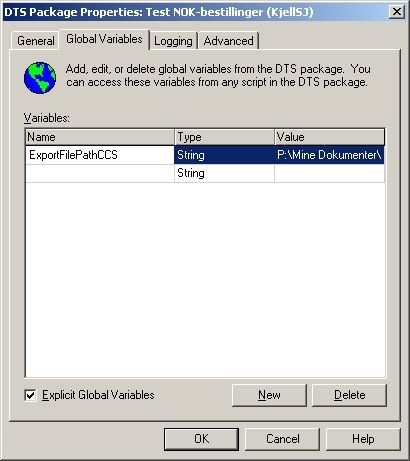
Use the 'Global Variables' folder in the 'DTS Package Properties' dialog to define the set of configuration parameters and their initial value. You must define the variables before using them as dynamic property values.
You will find a good introduction to SQL Server 2000 DTS and to SQL Server 2005 SSIS at Database Journal.

I will use a 'Transform Data Task' of type 'Write File' as an example, as this task contains a (output) FilePath property that is likely to change when the package is deployed to another server. In addition, any package that writes files, will most likely require some existing file cleanup mechanism. Deleting existing files is important to ensure that the package can be rerun in the event of a failure, and still produce the same results over and over (reliability).
The 'write file' task type is a special transformation that requires two source columns in the input, one for the target filename and one for the actual data to write to the file. In addition, the properties of the 'write file' task must be edited to specify the output path of the transformation, the file type, options such as overwrite existing files, append to existing files, etc.If you use the property dialog of the transformation, you are effectively hard coding the property values deep inside the each task. As the package grows bigger, it becomes harder and harder to remeber all the places that contains values that need to be re-configured when deploying to another server or changing the server setup. The documentation of how to configure the package will also become a real mess, as you need to describe how to configure every single element of the package.
 Whenever you are about to change a default property value of a DTS element (object), you should consider if the value is subject to requiring re-configuration dependent on the deployment environment. Such values are good candidates for becoming configuration parameters of the DTS package. There are several mechanisms in DTS for storing common configuration values, I prefer using global variables as they are an integral part of the package and easy to administer using the DTS designer.
Use the 'Global Variables' folder in the 'DTS Package Properties' dialog to define the set of configuration parameters and their initial value. You must define the variables before using them as dynamic property values.
Add a 'Dynamic Properties Task' as the first task in your package. Then add an 'On Success' workflow link to the rest of package steps to ensure that the package gets correctly configured before execution. Open the properties dialog of he dynamic properties object, then click 'Add' to open the window showing all package elements and their settable properties (see screenshot below).
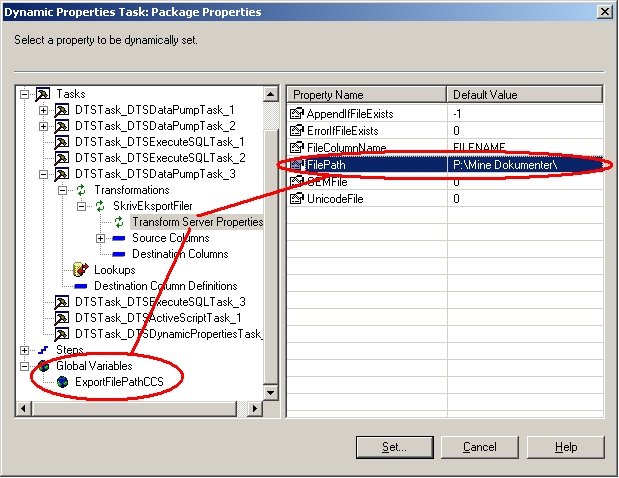
Browse to find the applicable 'write file' task and select the transformation properties node in the treeview. The right panel of the window will show the same properties as can be set directly on the task object, except that when setting the values from this window will make them configuration parameters instead of hard coded values. Select the property that you want to convert into a dynamic property, click 'Set' and then connect the property to the applicable global variable. Repeat for all properties that should be parameter based.
The configured output folder of the 'write file' task is also used in an 'ActiveX Script Task' that deletes all existing output files to make the DTS package process repeatable. The script uses the same global variable that was used in the 'write file' task:
Function Main()
path = DTSGlobalVariables("ExportFilePathCCS").Value
filemask = path & "export_file_mask_here"
Set fso = CreateObject("Scripting.FileSystemObject")
'NOTE: fso throws an error if no files match the mask on .DeleteFile
if fso.FileExists(filemask & ".000") = true then
fso.DeleteFile filemask & ".*"
end if
Main = DTSTaskExecResult_Success
End Function
You will find a good introduction to SQL Server 2000 DTS and to SQL Server 2005 SSIS at Database Journal.
Friday, August 12, 2005
Outlook recipients: AD contact postal address data
For our MSCRM customers we have made a small service that monitors the MSCRM database for changes to accounts and contacts, and maintains a specific Active Directory (AD) container that contains AD contacts that shadow the MSCRM accounts and contacts and their e-mail addresses. All these AD contacts are made available to Outlook through a new address book entry configured in Exchange System Manager. This ensures that all users have access to the e-mail information stored in MSCRM, even those that do not use Sales For Outlook. They can use the Outlook address book to pick or search for e-mail addresses and see details about an e-mail address such as contact name, company, postal address, etc.
The AD container is also used to hold AD distribution lists (mailing lists) built from the AD contacts. These distribution lists are also made available to Outlook through Exchange 2003. In addition, we have made a .NET add-in for Outlook that allows the users to preview the members of a list before sending e.g. the weekly newsletter e-mail (using an add-in toolbar in the e-mail Inspector window). The add-in allows the users to see the extra information stored in AD, and remove those members that should not get a mail this time. The users (ship brokers) typically decide that the e-mail should be sent to all members except those in Greece, and use the add-in to sort by country, multi-select the applicable members in a WinForms checkbox ListView and finally remove the selected members. This 'explodes' the mailing list into recipients, in addition to moving them to BCC to ensure that recipients do not see who else got this e-mail.
The code that maintains the AD contacts and the AD distribution lists runs on the Exchange Server 2003 to be able to modify data in both AD and Exchange (details here). Adding and maintaining AD contacts with .NET C# is quite easy, there are just a few pitfalls to be aware of when using AD contacts in combination with Exchange (details here).
The users recently requested the possibility to see the country of the MSCRM account/contact in the Outlook address book and when removing distribution list members. "No problem", I responded quickly and started checking postal address fields in Outlook and AD. I added full address information for an AD contact I knew was in the Outlook address book, waited for the RUS, and found the entered data in Outlook. I was ready to start coding !
First I added a 'country' column to my list view and then inspected the AddressEntry properties for access to postal address data. Unfortunately, Microsoft chose not to expose these properties in the Outlook object model. Fortunately, we were already using Redemption for other purposes in our add-in:
Redemption.MAPIUtils mapiUtils = new Redemption.MAPIUtils();
const int PR_COUNTRY = 0x3A26001E;
const int PR_EMAIL = 0x39FE001E;
foreach (Outlook.AddressEntry entry in list.Members)
{
string country = "";
object mapiCountry = mapiUtils.HrGetOneProp(entry.MAPIOBJECT, PR_COUNTRY);
if (mapiCountry != null) country = mapiCountry.ToString();
string smtp = entry.Address;
//check if Exchange address
if (smtp.StartsWith("/o="))
{
//get SMTP address from MAPI
smtp = mapiUtils.HrGetOneProp(entry.MAPIOBJECT, PR_EMAIL).ToString();
}
//add to listview
string[] items = new string[] { entry.Name, smtp, country };
ListViewItem itemX = new ListViewItem(items);
//keep name and address for later matching against recipients
itemX.Text = entry.Name;
itemX.Tag = entry.Address;
lstRecipients.Items.Add(itemX);
}
mapiUtils.Cleanup();
You will find a list of relevant MAPI property keys at OutlookCode.com.
The AD container is also used to hold AD distribution lists (mailing lists) built from the AD contacts. These distribution lists are also made available to Outlook through Exchange 2003. In addition, we have made a .NET add-in for Outlook that allows the users to preview the members of a list before sending e.g. the weekly newsletter e-mail (using an add-in toolbar in the e-mail Inspector window). The add-in allows the users to see the extra information stored in AD, and remove those members that should not get a mail this time. The users (ship brokers) typically decide that the e-mail should be sent to all members except those in Greece, and use the add-in to sort by country, multi-select the applicable members in a WinForms checkbox ListView and finally remove the selected members. This 'explodes' the mailing list into recipients, in addition to moving them to BCC to ensure that recipients do not see who else got this e-mail.
The code that maintains the AD contacts and the AD distribution lists runs on the Exchange Server 2003 to be able to modify data in both AD and Exchange (details here). Adding and maintaining AD contacts with .NET C# is quite easy, there are just a few pitfalls to be aware of when using AD contacts in combination with Exchange (details here).
The users recently requested the possibility to see the country of the MSCRM account/contact in the Outlook address book and when removing distribution list members. "No problem", I responded quickly and started checking postal address fields in Outlook and AD. I added full address information for an AD contact I knew was in the Outlook address book, waited for the RUS, and found the entered data in Outlook. I was ready to start coding !
First I added a 'country' column to my list view and then inspected the AddressEntry properties for access to postal address data. Unfortunately, Microsoft chose not to expose these properties in the Outlook object model. Fortunately, we were already using Redemption for other purposes in our add-in:
Redemption.MAPIUtils mapiUtils = new Redemption.MAPIUtils();
const int PR_COUNTRY = 0x3A26001E;
const int PR_EMAIL = 0x39FE001E;
foreach (Outlook.AddressEntry entry in list.Members)
{
string country = "";
object mapiCountry = mapiUtils.HrGetOneProp(entry.MAPIOBJECT, PR_COUNTRY);
if (mapiCountry != null) country = mapiCountry.ToString();
string smtp = entry.Address;
//check if Exchange address
if (smtp.StartsWith("/o="))
{
//get SMTP address from MAPI
smtp = mapiUtils.HrGetOneProp(entry.MAPIOBJECT, PR_EMAIL).ToString();
}
//add to listview
string[] items = new string[] { entry.Name, smtp, country };
ListViewItem itemX = new ListViewItem(items);
//keep name and address for later matching against recipients
itemX.Text = entry.Name;
itemX.Tag = entry.Address;
lstRecipients.Items.Add(itemX);
}
mapiUtils.Cleanup();
You will find a list of relevant MAPI property keys at OutlookCode.com.
Then I modified our AD updater service to read the country of each MSCRM account/contact to be able to set it on each AD contact. I used the ADSIEdit MMC snap-in to inspect the properties of my 'guinea pig' AD contact to see which property was used for storing the country. The 'co' property contained the country name, and the property 'countryCode' seemed to have something to do with a contact's country. Some googling lead me to MSDN, which revealed that these three properties must be set according to ISO 3166:
- c: two letter country designation
- co: country name
- countryCode: country code (integer)
You will find the ISO 3166 list here. Copy and save the list to a .TXT file, open it in Excel as a 'fixed width' file to convert the text into a useful .XLS table. Use SQL Server 2000 DTS to import the .XLS to a new table in your database, enabling you to lookup MSCRM country names in the ISO 3166 country list.
The code to set MSCRM data into an AD contact properties looks like this:
//set properties
adContact.Properties["DisplayName"].Value = displayName;
adContact.Properties["mail"].Value = mailAddress;
//NOTE: AD fails on empty string, "invalid attribute syntax"
if(firstName.Length!=0) adContact.Properties["givenName"].Value = firstName;
if(lastName.Length!=0) adContact.Properties["sn"].Value = lastName;
if(company.Length!=0) adContact.Properties["company"].Value = company;
if(department.Length!=0) adContact.Properties["department"].Value = department;
if(country.IndexOf(";")>0)
{
//format: name;code;number
country += ";;;"; //just to be sure
string[] parts = country.Split(new char[]{';'});
string countryName = parts[0];
string countryA2 = parts[1];
string countryCode = parts[2];
if(countryName.Length!=0) adContact.Properties["co"].Value = countryName;
if(countryA2.Length!=0) adContact.Properties["c"].Value = countryA2;
if(countryCode.Length!=0) adContact.Properties["countryCode"].Value = Convert.ToInt32(countryCode);
}
// Flush to the directory
adContact.CommitChanges();
Note that I chose to require the country information to be provided as a semicolon separated string just for "simplicity" as I have not used entity objects (data xfer objects) in my AD service. I think refactoring of my service interface is needed, soon the users will want "just one more field" to be added...
Programming tip: use a reverse for-loop (i--) when removing entries from the Outlook.MailItem.Recipients collection, because the collection changes when a recipient is removed and this messes up the iteration if not performed end-to-beginning.
Subscribe to:
Posts (Atom)