In a previous post, I described how we integrate SharePoint team-sites into MSCRM to provide collaboration features and to provide document archive functionality to our MSCRM customers. We typically give the users the ability to create WSS team-sites for each account, each opportunity or for each custom entity such as 'project'. If the customer also uses SharePoint Portal Server (SPS), we register the team-sites in the site directory and include them in SPS search scopes to ensure that e.g. documents are indexed by the SPS search engine.
In addition, we provide an Office add-in that allows users to directly archive Word documents and Outlook e-mail messages into the MSCRM team-sites (much like the "snap"). MSCRM has poor support for storing documents (only as attachments to notes), and the support for creating new documents from templates and merging data from the database is not very much better. The rather lackluster support for document production in MSCRM is something potential customers always react negative to in sales meetings.
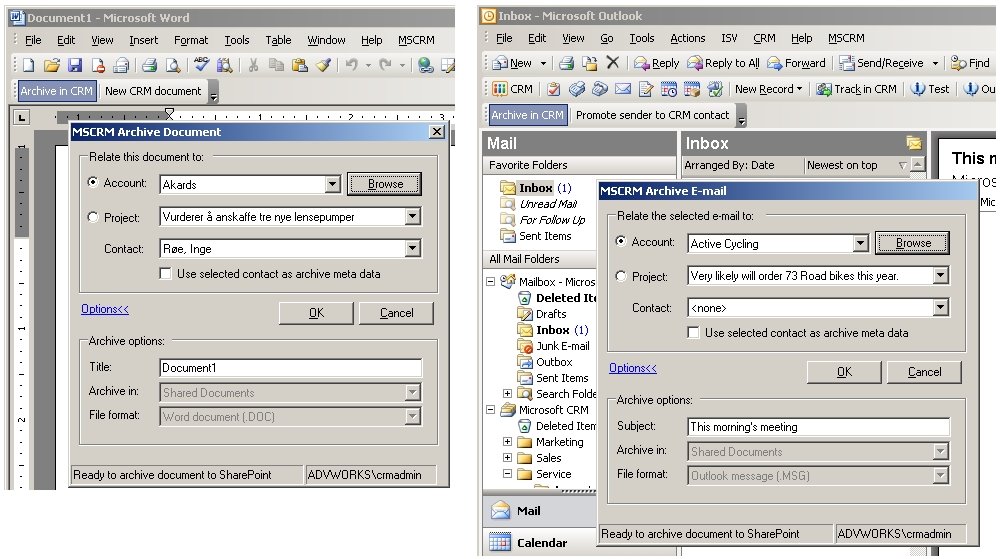
This screenshot collage shows how the add-in is used in Word and Outlook (click to enlarge):
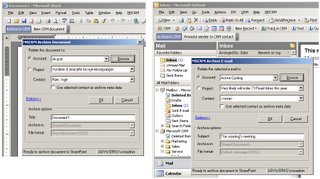 E-mails are archived using the .MSG format. The SPS search engine can be configured to index .MSG files, thus making it easier to find archived messages. Documents are readily indexed by SPS out-of-the-box.
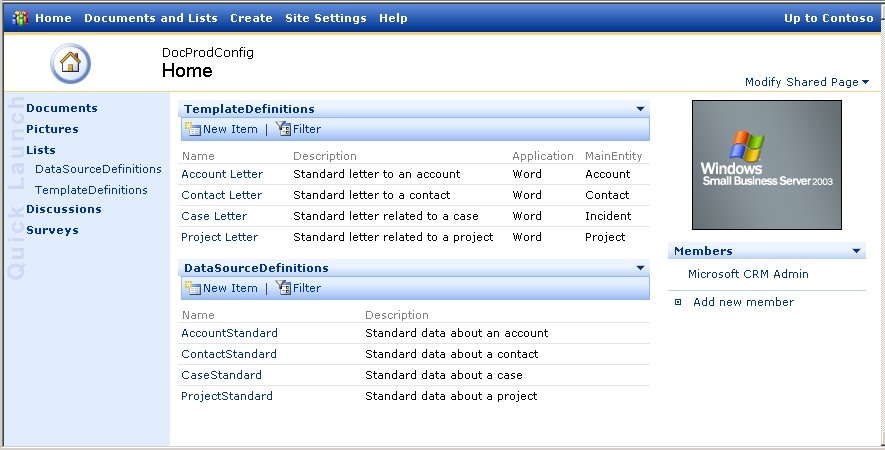
The templates and the datasets that they use, are configured using a 'document production admin' team-site, and the add-in uses the standard WSS web-services to get the list of templates:
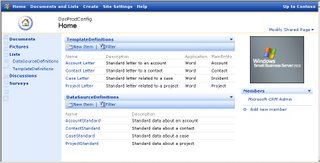 The templates support merging in data from the datasets into placeholders in the document (bookmarks, document variables, [xml element name] literal text). The merge engine is simple and requires no scripting of each template: it just loops through the dataset and looks for all placeholders with the same name as the dataset column names:
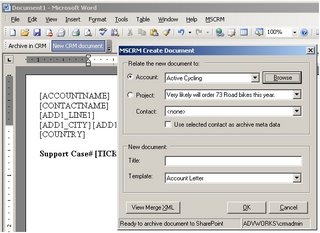 The produced document is of course automatically archived to the correct team-site when the merging has finished (screenshot). Optionally, a post merge Word macro can be run should a template require some scripting, e.g. to create an table listing the details of a quote.
The merge data used in the templates are provided through custom web-services. Stored procedures using FOR XML AUTO, ELEMENTS are used to return the dataset to the add-in as XML. A stored procedure takes some MSCRM entity IDs as input, and then retrieve data from the MSCRM database, and possibly other datasources, to provide one or more resulting datasets. This allows for returning data about e.g. both an account, its primary contact, a quote and quote details in one go.
The Office add-in (.NET1.1, non-VSTO) currently supports Office 2000, XP, and 2003. It might be made available to other Microsoft partners this spring, keep an eye on this blog for further details.
In my use of the Noogen.Validator component for doing WinForms validation in a VS2005 project, I could not get validation of required 'currency' (decimal) fields to work properly. The Noogen datatype based validation rules utilizes the BaseCompareValidator of the System.Web.UI.WebControls namespace to do the .CanConvert() and .Compare() tests. This allows for Noogen to do culture aware validation of dates and numbers by reusing .NET framework components.BaseCompareValidator.CanConvert(String, ValidationDataType)BaseCompareValidator.Compare(String, String, ValidationCompareOperator, ValidationDataType)Validation of required fields uses ValidationCompareOperator set to Equal to compare the entered value against the specified initial value of the field (typically ""), and the the required check returns true when these values differs. But this mechanism did not work as expected.After a lot of frustration and a bit of debugging, I got these strange results using the 'Immediate' windows in VS2005:? ValidationUtil.Compare("123", "", vco, vdt)true? ValidationUtil.Compare("123", "0", vco, vdt)falseThus, the BaseCompareValidator considers the two 'currency' fields "123" and "" to be equal, which is clearly not true. The 'culture-neutral format' compare has the same bug.The Noogen.Validator discussion thread suggests that this error also applies to 'double' also. In fact, it might apply to all datatypes other than 'string'.
Microsoft has released an Office Word 2003 add-in that lets you insert data from MSCRM into documents and archive documents as MSCRM note attachments. Read more at Johnz blog.
The source code is available at GotDotNet in this workspace.
We use the new .NET 2.0 DataGridView extensively in my current project, in combination with object bindingsources. We have several user-controls where the grid is the position/current source for other controls in the UC, e.g. master-details grids, selected grid-row edit form, etc. All of our grids are in single select/FullRowSelect mode. Thus, the when the selected row changes, so do all the controls bound to the grid (actually bound to the same bindingsource as the grid).The SelectionChanged event of the DataGridView tells you when the selected row changes, and this event trigger quite often, in fact more often than you would expect. It triggers during:- binding: the first row always gets selected
- unloading: the selections are cleared
- resize: the selections are first cleared, then all of them gets selected again
- sorting: the selections are first cleared, then the grid selects whatever rows got the same row index in the grid, which most likely are not the same records that were selected before sorting
Typically, a user-control gets instantiated and initialized by its parent, and then the parent does .Dock=Fill on the UC. Thus, the the SelectionChanged event will trigger three times during load: when a user-controls gets loaded, the DataGridView gets bound and the first row gets selected (first), then the resize event causes unselecting the row (second) and then the reselection og the first row (third).
We do layz loading of the details data, i.e. we do not access the application services to get the detail data until the user selects a row in the grid. I noted that the UC took a long time to load, and when I added a breakpoint to see why, I was quite surprised when the data got loaded three times during load. The extra load was caused by me setting a selected row after binding, as this had to be done in .NET 1.1 grids from Microsoft, but is no longer needed as the DataGridView always select the first row. I wish there was an option on the grid to turn the auto-select off.
Thus, what is needed is some extra logic to remember which record is the current in the binding source (note: not which row in the grid), then check in the SelectionChanged event whether the current record actually was changed, or whether it is just the eager event triggering. Use a helper class member to keep the ID of the selected record. Do your data loading only when the current record changes, otherwise, just rebind to the already fetched data.
The next (expected) surprise I got was when I added sorting to the binding source of the DataGridView. The same effect happended as during the load resizing: the selections got cleared and then set again, but it does not select the same records again, it only selects the same rows as before. As the records are now sorted a different way, the record previously at row 4 is now e.g. at row 17, but the grid "dutifully" selects row 4 anyway. Thus, you need to implement some find logic, or just call .ClearSelection() on the grid.
I chose to clear the selection after sorting, and wanted to suppress the reselect SelectionChanged event that happens during sorting, as this caused unnecessary binding to random record which I would immediately clear. The grid has a Sorted event that happens when the sorting has completed and after the selection events, but there is no begin sorting event. I needed another helper class member to tell the SelectionChanged event hander that the grid is currently sorting. I thought the ColumnHeaderMouseClick event would let med set an _isSorting boolean flag, but this event happens after the Sorted event, far to late for my use.
I ended up using the MouseDown event and some classical x,y hit testing to deduce that a sort operation was about to begin:
Private Sub dgwMaster_MouseDown(ByVal sender As System.Object, ByVal e As System.Windows.Forms.MouseEventArgs) Handles dgwMaster.MouseDown
Dim hti As DataGridView.HitTestInfo = dgwMaster.HitTest(e.X, e.Y)
If hti.Type = DataGridViewHitTestType.ColumnHeader Then
_isSorting = True
End If
End Sub
Private Sub dgwMaster_Sorted(ByVal sender As System.Object, ByVal e As System.EventArgs) Handles dgwMaster.Sorted
_isSorting = False
End Sub
The final surprise when it comes to binding is about the impedance difference between object binding sources and the DataGridView: a DataGridView can have no selection (just CTRL+click a selected row), while an object bindingsource always have a .Current item when the source is not empty. Setting .Postion to -1 on a bindingsource has no other effect that selecting the first item in the binding source. Thus, to allow for no selection in bound controls, you have to remove the .DataSource of those controls temporarily when the grid have no selection. I wish there was an option to enforce the grid to always have a selection. You can make a dervied grid and override MouseDown and then not call the base class OnMouseDown method to cancel the mouse click.
Due to this impedance difference, always remember to check that a row is selected in the grid before using the bindingsource .Current property to get the currently selected record: If _isSorting = True Then Exit Sub
'ensure that a row is selected
If dgwMaster.SelectedRows.Count = 0 Then
dgwDetails.DataSource = Nothing
Else
Dim response As OrderDetailsResponse
'get details
Dim master As Order = CType(OrderBindingSource.Current, Order)
If master.orderId = _lastOrderId Then
'avoid reget on resize, just reconnect bindingsource
dgwDetails.DataSource = OrderOverføringBindingSource
Else
_lastOrderId = master.orderId
response = _orderMgr.GetOrderDetails(master.orderId)
_details = response.ItemList
If dgwDetails.DataSource Is Nothing Then
'sorting changes current master, need to reconnect bindingsource
dgwDetails.DataSource = OrderDetailsBindingSource
End If
End If
End If
No wonder that the DataGridView program manager Mark Rideout is quite busy answering questions at the Windows Form DataBinding forum.
 E-mails are archived using the .MSG format. The SPS search engine can be configured to index .MSG files, thus making it easier to find archived messages. Documents are readily indexed by SPS out-of-the-box.
 The templates support merging in data from the datasets into placeholders in the document (bookmarks, document variables, [xml element name] literal text). The merge engine is simple and requires no scripting of each template: it just loops through the dataset and looks for all placeholders with the same name as the dataset column names:
 The produced document is of course automatically archived to the correct team-site when the merging has finished (screenshot). Optionally, a post merge Word macro can be run should a template require some scripting, e.g. to create an table listing the details of a quote.

